Back
Voice AI & Telephony

A Unified Desktop Softphone Integrating Telephony, SMS and CRM Lookup for Recruiting Teams

How Pfactorial Technologies built a native desktop dialer that unifies calling, SMS/MMS, voicemail and CRM candidate lookup behind one Electron application, backed by a dedicated SIP engine and PBX infrastructure.

August 21, 2026
Share
ENGAGEMENT SNAPSHOT

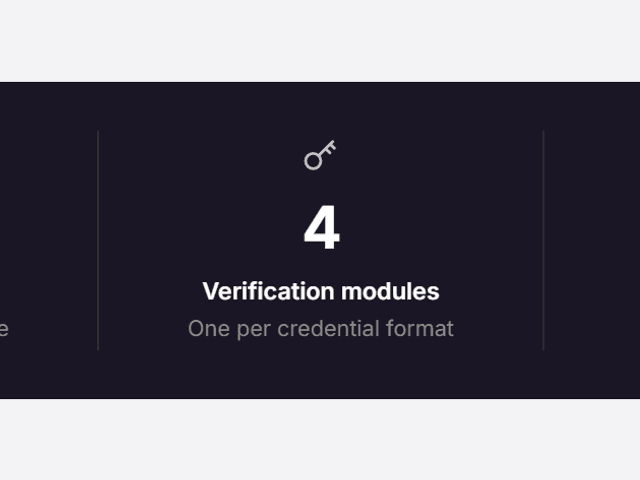
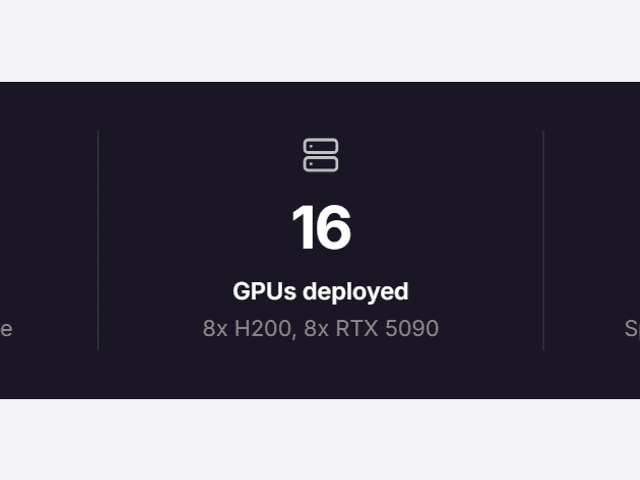
Pfactorial_Case_Study_Unified_Desktop_Softphone image 1
Figure 1 - Key figures from this engagement, at a glance.
EXECUTIVE SUMMARY
Our client's recruiting team relied on separate tools for calling, texting and candidate lookup - a fragmented workflow that cost time on every single call and made it hard to bring candidate context into a conversation before it even started.
A desktop softphone that actually holds up for daily recruiting call volume needs a real SIP telephony stack, not a browser-based approximation - reliable audio quality, proper codec support and multi-device registration are table stakes a WebRTC-only approach doesn't reliably deliver.
Pfactorial built a unified Electron desktop application pairing a native Python SIP engine (PJSUA2/PJSIP) with a React interface, integrated with the client's recruiting CRM for automatic caller lookup, backed by FreePBX and Telnyx telephony infrastructure across development and production environments.
Why this engagement is representative This engagement demonstrates Pfactorial's ability to build at the systems level - a native telephony engine bridged to a modern desktop UI - for a workflow tool that has to be reliable enough for daily, high-volume professional use, not just a demo.
THE CHALLENGE
Unifying a recruiter's daily communication workflow into one reliable desktop tool required solving problems a browser-only or CRM-bolted-on approach couldn't.

1. Recruiters juggle disconnected calling, texting and CRM tools

Without a unified interface, every call or text requires switching context between separate applications, and candidate history has to be looked up manually rather than surfacing automatically.

2. Reliable telephony needs a real SIP stack

Consistent audio quality, proper codec support, and multi-device extension registration require a native SIP engine - a browser-only WebRTC approach doesn't reliably deliver professional call quality at volume.

3. Caller context matters most before the call is answered

Knowing who's calling - pulled from the recruiting CRM - needs to appear on the incoming-call screen itself, not after the recruiter has already picked up.

4. Telephony infrastructure has to run consistently across environments

SIP trunking, extensions, ring groups and call routing all need to work reliably across both development and production without manual reconfiguration drift between them.
The real brief Not “build a softphone app” but “unify a recruiter's entire calling, texting and candidate-lookup workflow behind one reliable desktop tool, backed by real telephony infrastructure.”
THE SOLUTION
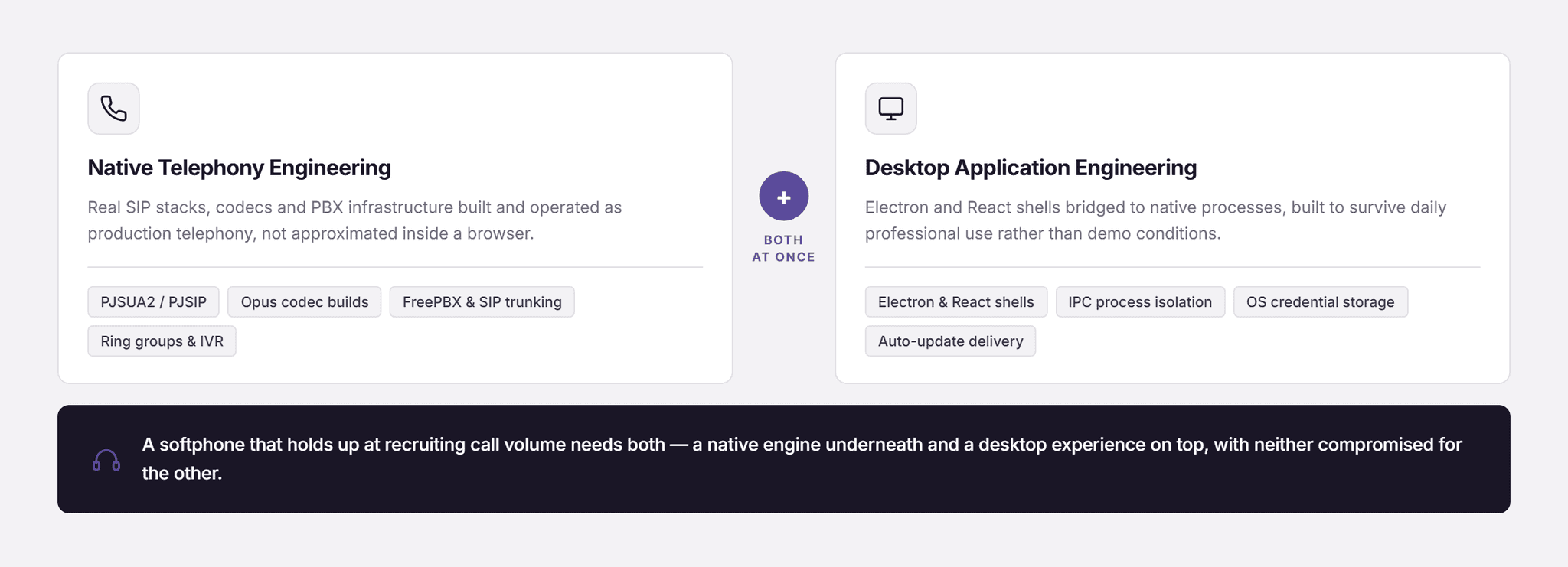
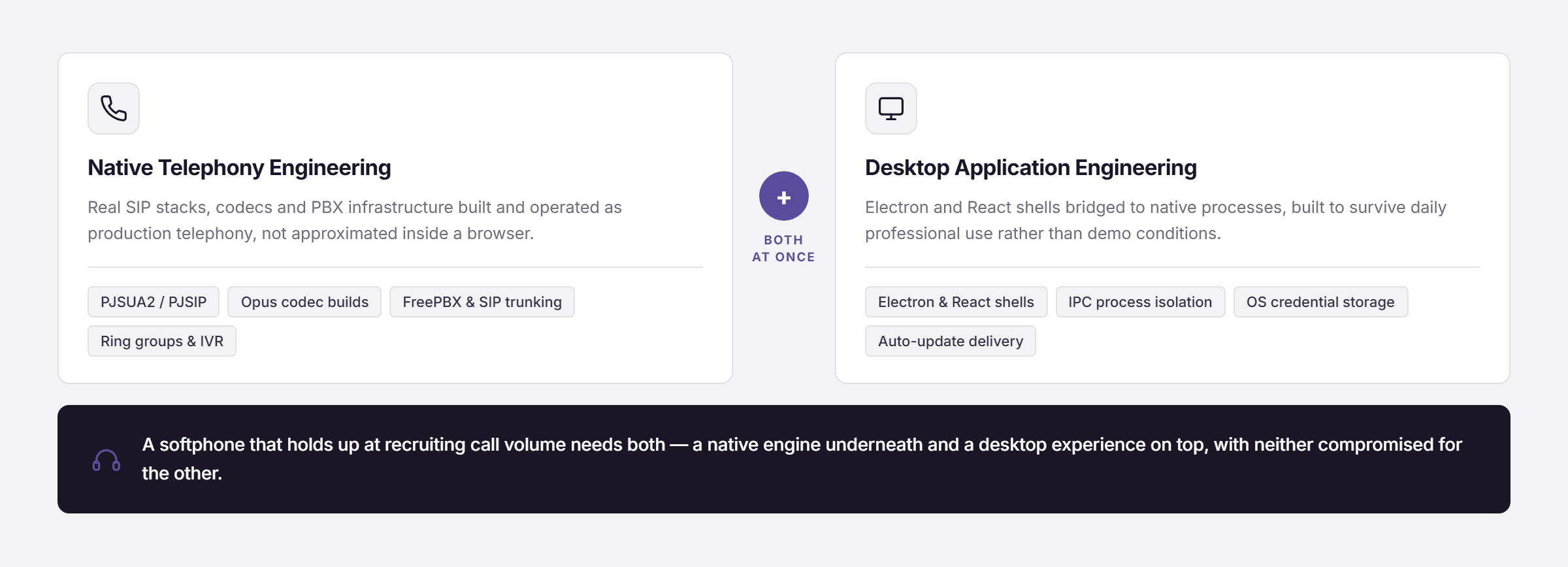
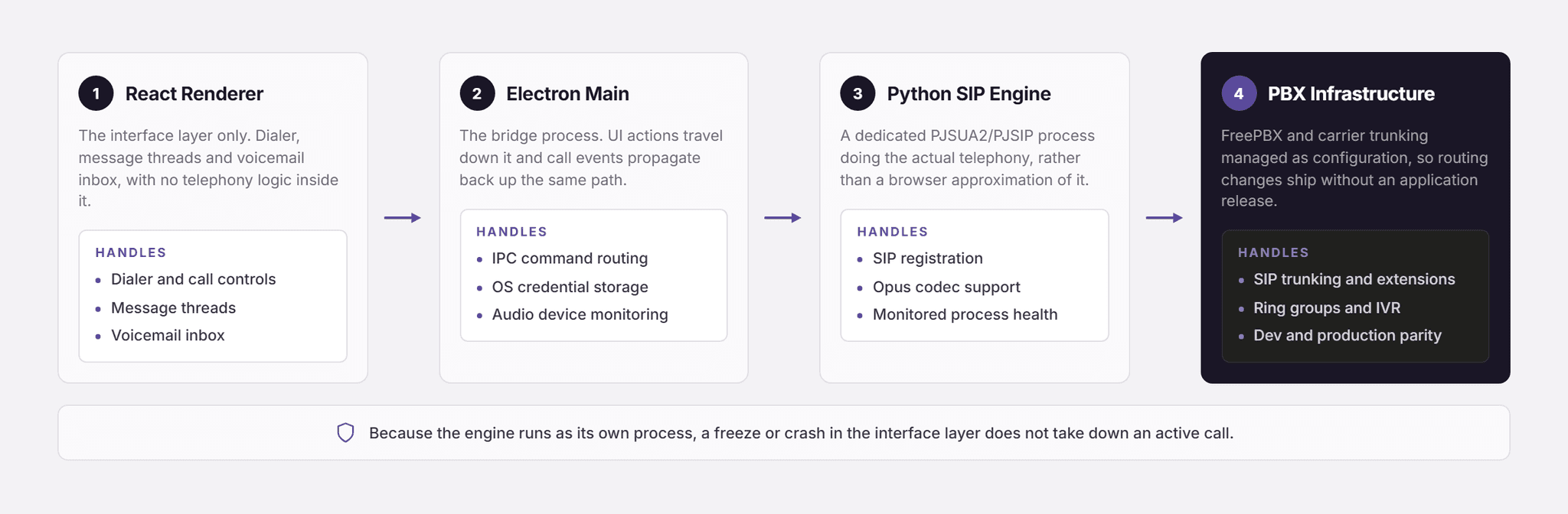
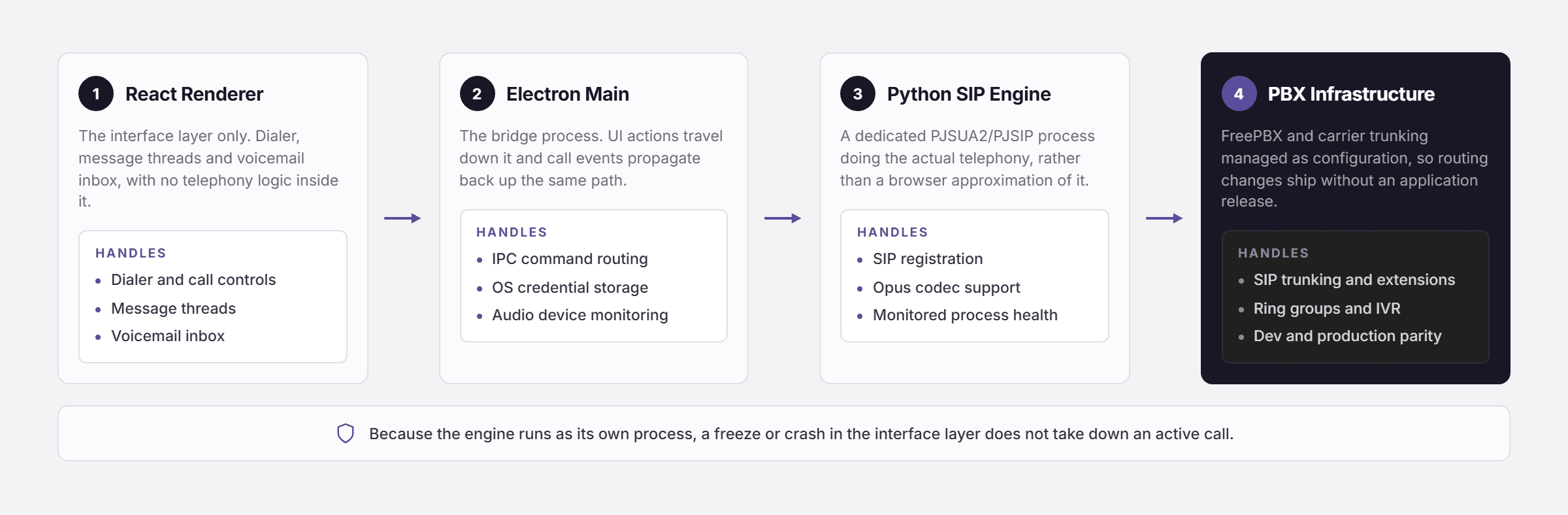
Pfactorial paired a native Python SIP engine with an Electron/React desktop shell connected via IPC, integrated with the client's recruiting CRM for automatic caller context, and backed by FreePBX-managed telephony infrastructure.
Pfactorial_Case_Study_Unified_Desktop_Softphone image 2
Figure 2 - A native SIP engine, a modern desktop shell, and PBX infrastructure working together.

Architectural principles

  • Native telephony paired with a modern desktop shell - A dedicated Python SIP process (PJSUA2/PJSIP) handles the actual telephony, while Electron and React handle the user interface, connected through Electron's IPC bridge rather than forcing telephony logic into the UI layer.
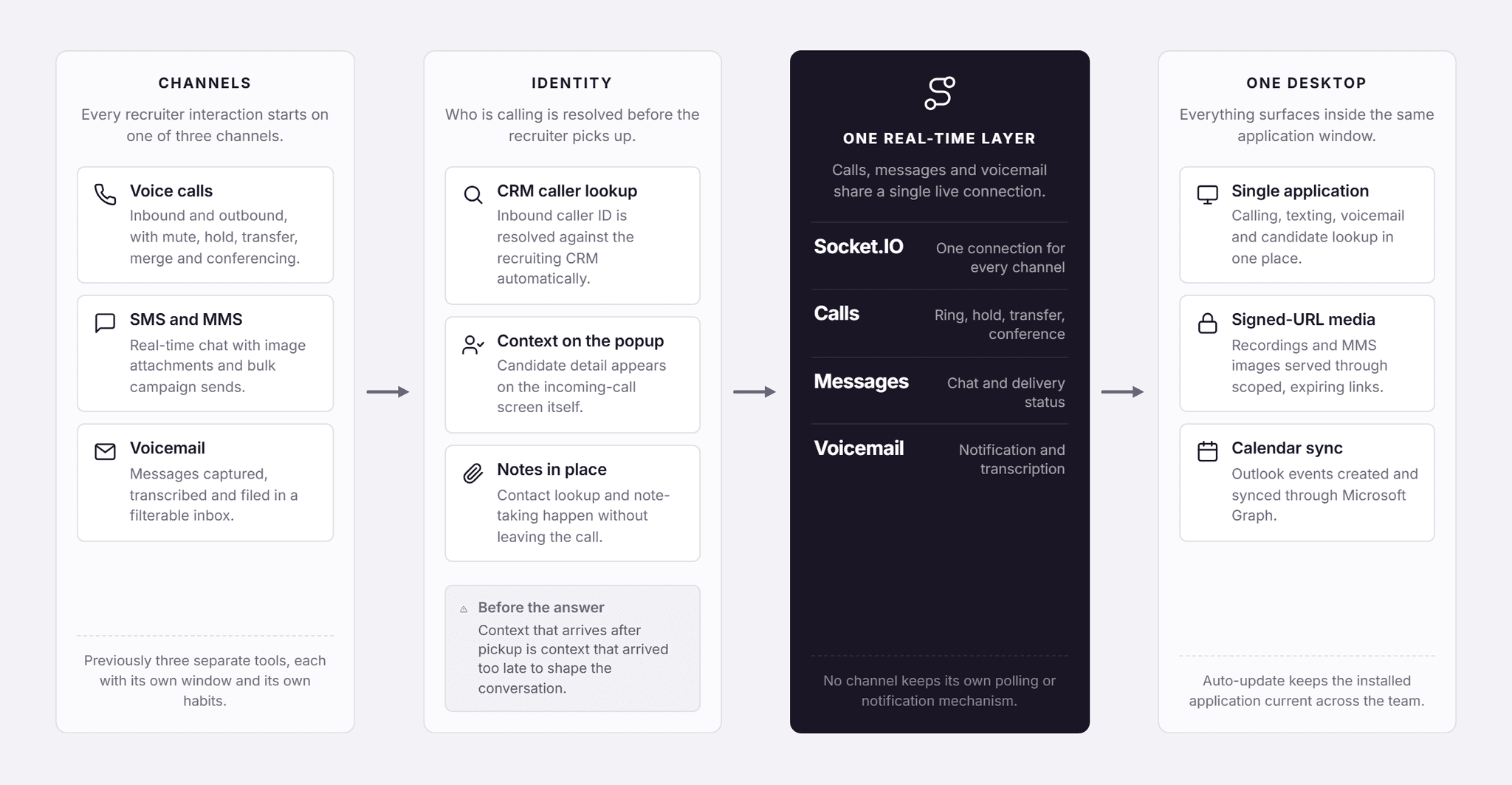
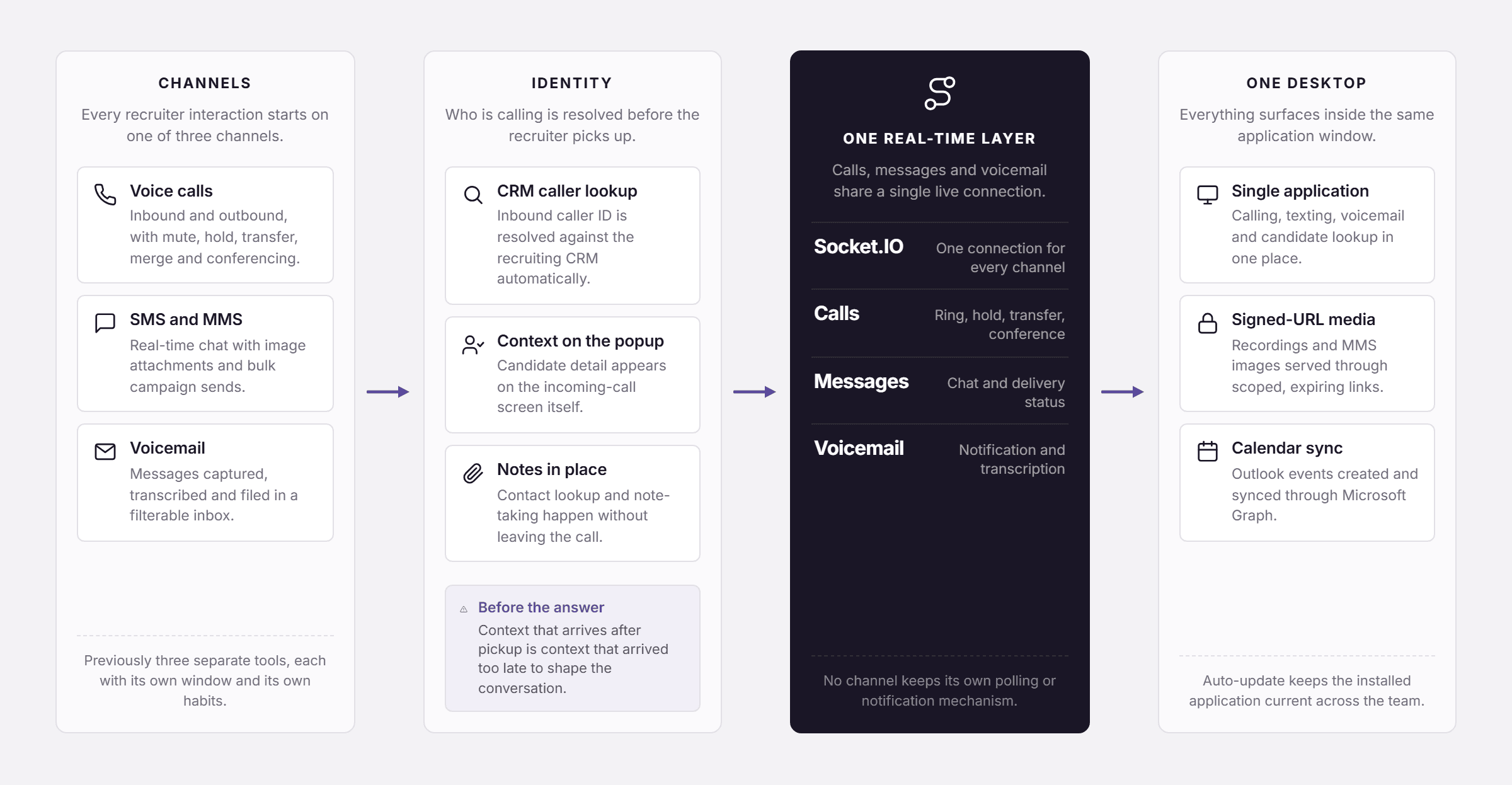
  • CRM context surfaces automatically - Inbound caller ID is resolved against the recruiting CRM and displayed on the incoming-call popup before the recruiter answers, rather than requiring a manual lookup after the fact.
  • Real-time channels share one presence layer - Calling, SMS/MMS and voicemail notifications all route through the same Socket.IO real-time connection rather than each maintaining its own separate polling or notification mechanism.
  • PBX infrastructure as configuration, not application code - SIP trunking, extensions, ring groups and IVR menus are managed through FreePBX's admin interface, keeping telephony routing changes independent of application deployments.
CAPABILITIES DELIVERED
Ten feature categories span calling, messaging, CRM integration and infrastructure - each addressing a specific gap in the previous fragmented workflow.
CAPABILITY
WHAT IT DOES
Full-featured calling
Outbound/inbound calling with mute, hold, transfer, merge, multi-party conferencing, and call recording to S3.
SMS & MMS messaging
Real-time chat, image attachments, and bulk SMS campaigns with delivery status tracking.
Voicemail with transcription
Email notification with transcription text and a playback link, plus a filterable voicemail inbox.
CRM caller identification
Automatic caller lookup against the recruiting CRM, displayed on the incoming-call popup.
Ring groups & IVR
Multi-device ring groups and interactive voice response menus, managed through FreePBX.
Outlook calendar integration
OAuth2-connected calendar event creation and sync via Microsoft Graph API.
Pfactorial_Case_Study_Unified_Desktop_Softphone image 3
Figure 3 - Calling, messaging, voicemail and CRM lookup unified behind one real-time layer.
Design note Routing SIP commands through a dedicated IPC path - UI to SipUAContextProvider to the Electron main process to the Python SIP engine, with events propagating back the reverse path - keeps the telephony engine fully isolated from the renderer. A UI freeze or crash in the interface layer doesn't take down an active call.
ENGINEERING FOR SCALE AND RELIABILITY
Six decisions carry the application through the reliability demands of daily, high-volume recruiting call and message workflows.

IPC-isolated telephony architecture

The renderer, Electron main process, and Python SIP engine each own a distinct responsibility, communicating over IPC rather than sharing state directly - isolating telephony reliability from UI-layer issues.

Secure local credential storage

Login credentials are stored via the operating system's native credential manager rather than in application-level storage, with one-click removal available from settings.

Dynamic audio device handling

The application automatically switches input/output audio devices mid-call using native OS-level monitoring of plug/unplug events, falling back to the system default when needed.

Custom codec integration

The Opus codec was compiled into the SIP engine's native binaries specifically to improve audio quality beyond the stack's default codec support.

Process health monitoring tied to session lifecycle

The Python SIP process's health is actively monitored with periodic checks, and its lifecycle is tied to user login/logout, ensuring a stale or crashed telephony process doesn't silently persist.

Signed-URL media access with S3

Call recordings and MMS images are stored in S3 with IAM-scoped access and signed URLs carrying expiry, rather than direct public storage access.
DELIVERY APPROACH
The engagement built the native SIP engine and telephony infrastructure first, then layered messaging, CRM integration and desktop polish on top.
1. SIP engine integration - PJSUA2 build with Opus codec support, providing the native telephony foundation.
2. Desktop shell - the Electron/React application with IPC-bridged communication to the SIP engine.
3. PBX infrastructure - FreePBX deployment with SIP trunking, extensions, ring groups and IVR, configured across development and production.
4. CRM integration - caller identification, contact lookup, and note-taking connected to the recruiting CRM.
5. Messaging & voicemail - SMS/MMS with bulk campaign support, and transcribed voicemail with email notification.
6. Deployment & auto-update - S3-based auto-updater infrastructure and application health monitoring.
RESULTS AND IMPACT

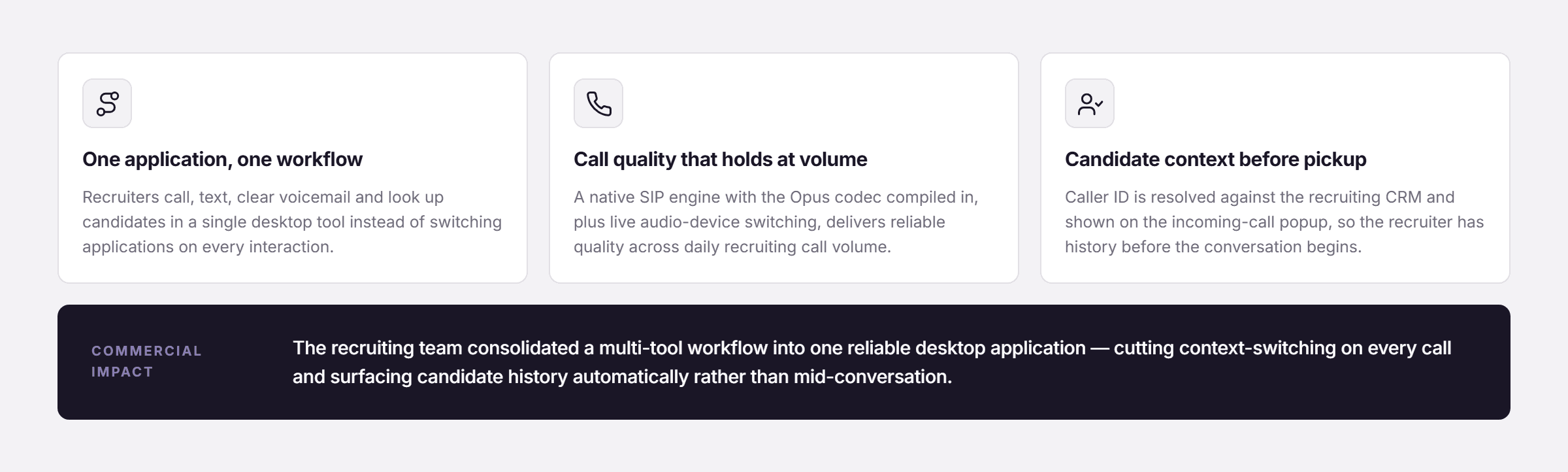
Pfactorial_Case_Study_Unified_Desktop_Softphone image 4
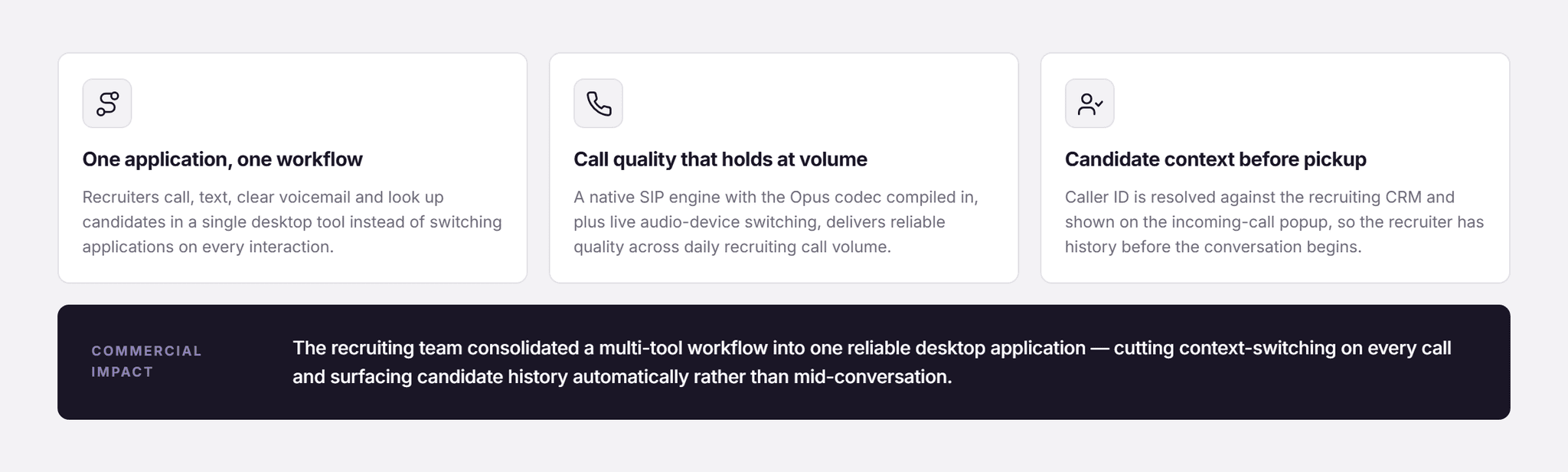
Figure 4 - Key outcomes from this engagement.
Recruiters now work from one desktop application for calling, texting, voicemail and candidate lookup, with caller context appearing automatically before a call is even answered.
The native SIP engine, tuned with Opus codec support and dynamic audio device handling, delivers reliable call quality across the recruiting team's daily call volume.

What it enabled commercially

The client's recruiting team consolidated what was previously a multi-tool workflow into one reliable desktop application, reducing context-switching on every call and surfacing candidate history automatically rather than requiring a manual CRM lookup mid-conversation.
WHY PFACTORIAL
This engagement reflects Pfactorial's ability to build at the systems level - integrating a native telephony engine, a modern desktop UI, and CRM and PBX infrastructure into one reliable daily-use tool, not just a browser-based softphone approximation.
Pfactorial_Case_Study_Unified_Desktop_Softphone image 5
Figure 5 - Service lines this engagement draws on.
Engagement enquiries Pfactorial Technologies works with organizations that need reliable, unified telephony and communication tools integrated with their existing CRM and business systems. If you're evaluating a custom softphone or unified communications platform, we're happy to give you an honest read on scope and risk before anyone commits to anything. · pfactorial.ai
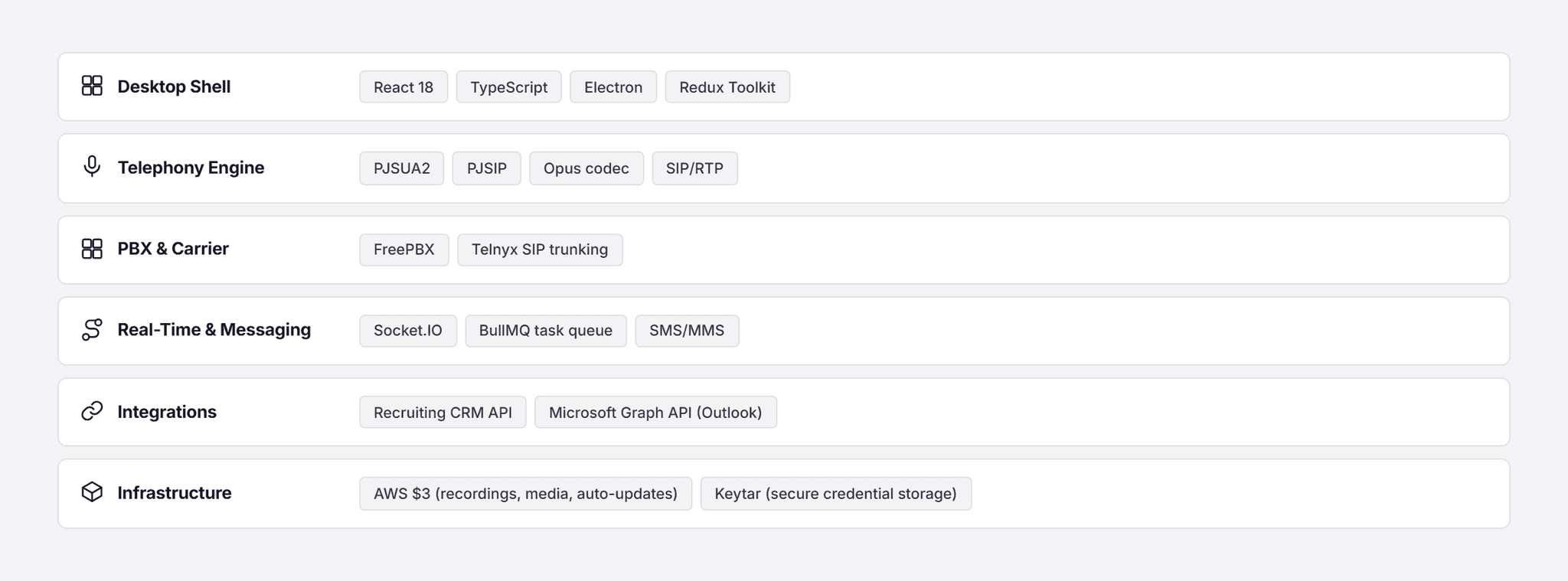
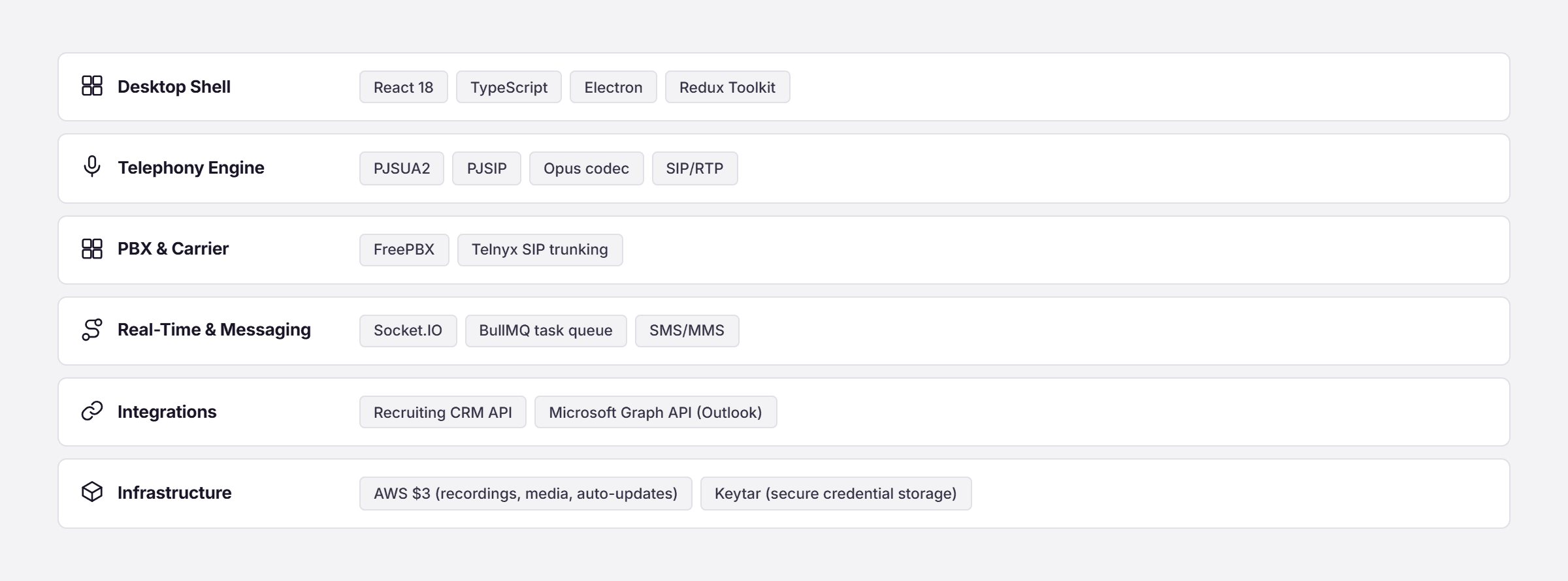
APPENDIX A - TECHNOLOGY STACK
The technology stack underpinning the system, grouped by the layer it serves.
Pfactorial_Case_Study_Unified_Desktop_Softphone image 6
© 2026 Pfactorial Technologies. Client identity and product-specific implementation detail are withheld or generalized; no client data, credentials, source code, or infrastructure detail is included in this document.

Result and Analysis

ENGAGEMENT SNAPSHOT

How Pfactorial Technologies built a native desktop dialer that unifies calling, SMS/MMS, voicemail and CRM candidate lookup behind one Electron application, backed by a dedicated SIP engine and PBX infrastructure.

Pfactorial_Case_Study_Unified_Desktop_Softphone image 1
Pfactorial_Case_Study_Unified_Desktop_Softphone image 2
Pfactorial_Case_Study_Unified_Desktop_Softphone image 3
Pfactorial_Case_Study_Unified_Desktop_Softphone image 4
Pfactorial_Case_Study_Unified_Desktop_Softphone image 5
Pfactorial_Case_Study_Unified_Desktop_Softphone image 6