Back
Enterprise Ops Platforms

Unlocking the Power of Low-Code/No-Code Solutions: A Beginner's Guide

Author
Pfactorial
June 28, 2024
Share
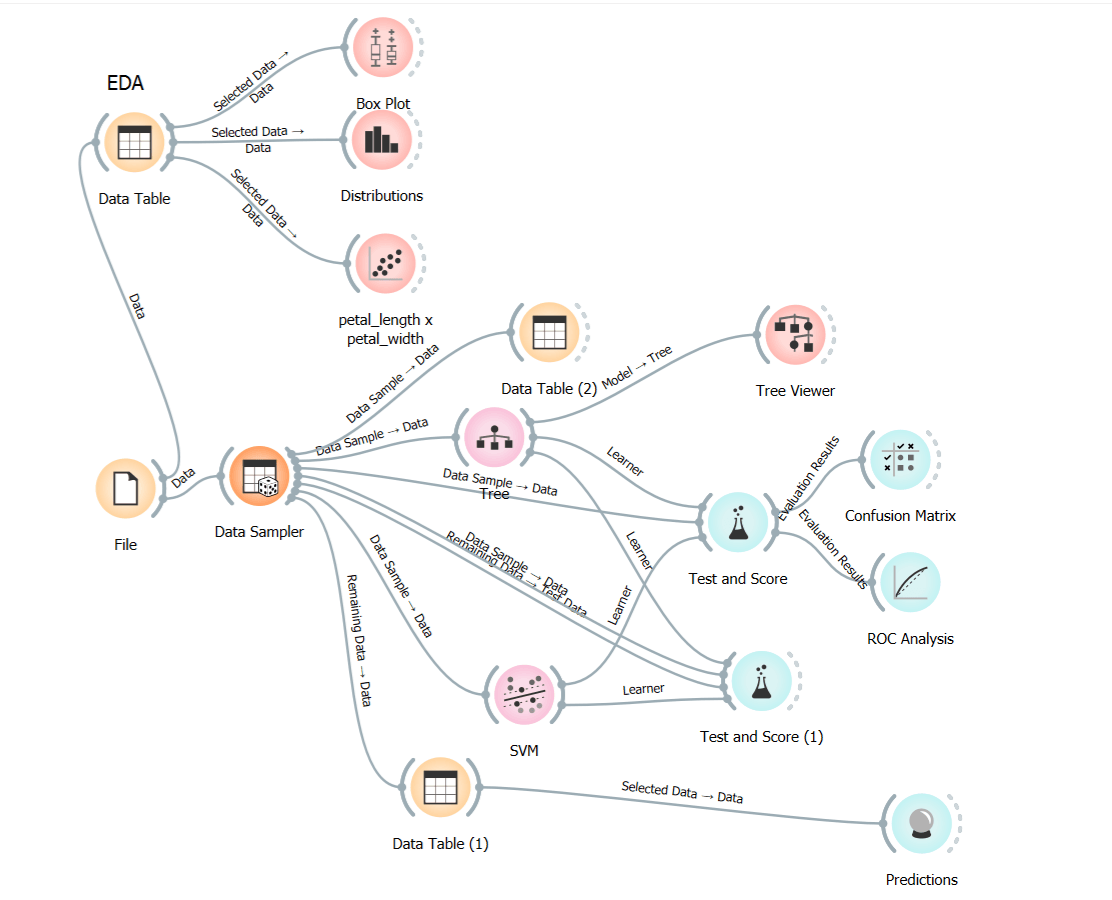
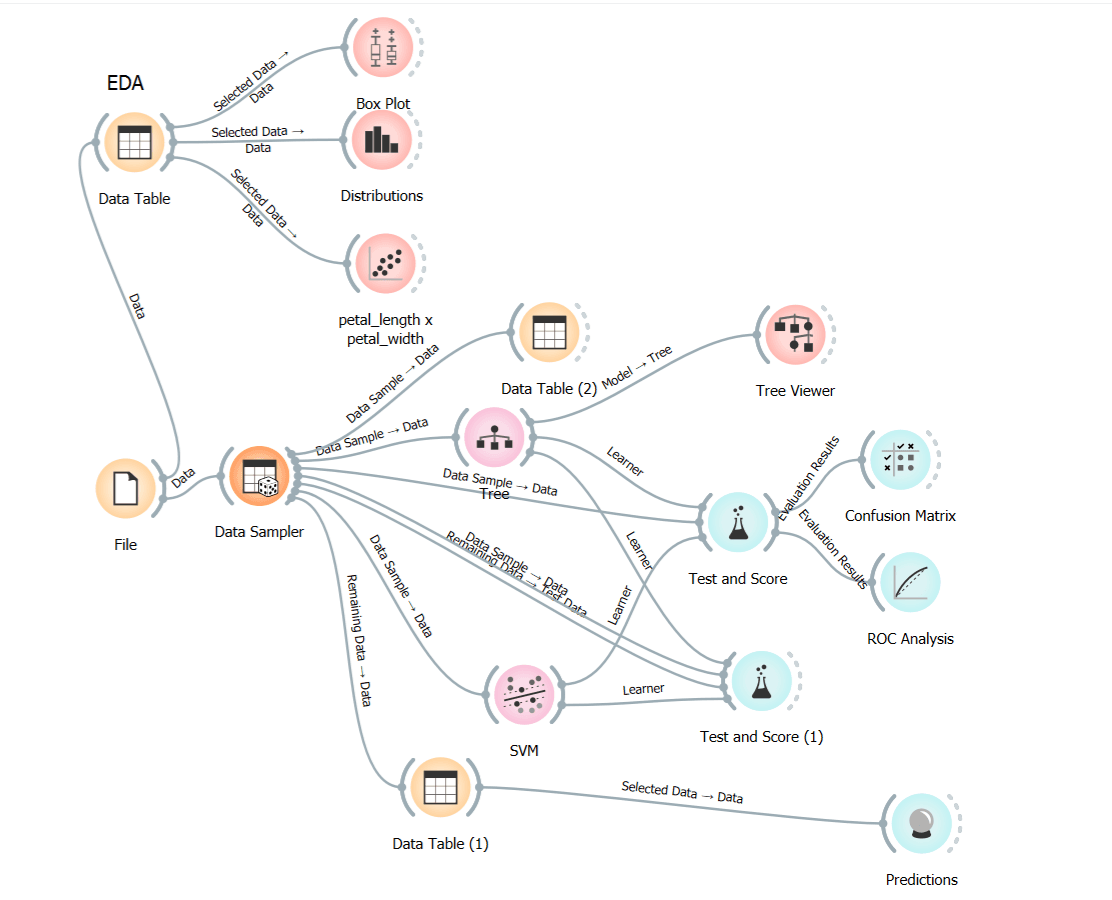
overall data flow no code low code
Introduction
In today's fast-paced business landscape, efficiency and adaptability are key. To keep up with the demands of the modern world, businesses are constantly seeking ways to work smarter and faster. Earlier, businesses had two choices when they wanted to create computer programs: either purchase pre-made ones from outside companies or make their own from the beginning with expert programmers. But now, we're witnessing the emergence of simpler options called Low-Code/No-Code (LCNC) solutions which are innovative tools that change the way we create software applications, making it easier for individuals within a business, regardless of their technical expertise, to design and develop their own custom applications.
low code no code introduction
Low-Code Development: Simplifying the Process
Low-code development is revolutionizing the software development process. Instead of laboriously writing lines of code, developers can utilise intuitive visual interfaces, drag-and-drop tools, and pre-built templates to create powerful applications. This approach significantly streamlines the development cycle, making it accessible to a broader range of individuals within an organization.
No-Code Development: Coding Not Required
No-code development takes things a step further by eliminating the need for coding altogether. It empowers business users with domain knowledge to craft custom applications using the same user-friendly visual interfaces, drag-and-drop tools, and pre-built templates. This democratizes the development process, bridging the gap between IT and other departments.

Advantages of LCNC Solutions
  • Democratization of Technology: LCNC platforms enable individuals from various departments to contribute to development, even if they lack coding experience.
  • Rapid Development: By minimizing manual coding, LCNC solutions accelerate software development.
  • Accessibility: Non-tech experts can participate in app development, fostering collaboration across departments.
  • Agility: LCNC tools facilitate rapid prototyping, allowing developers to adapt quickly to user feedback and changing project requirements.
  • Cost-Effectiveness: LCNC solutions require smaller teams, lower upfront expenses, and reduced ongoing costs compared to traditional development.
Distinguishing Low-Code from No-Code Solutions
Low-Code:
  • Aimed at professional developers who may require some coding for complex functionality.
  • Offers more UI customization options.
  • Allows users to extend functionality through code, providing greater flexibility and reusability.
No-Code:
  • Targeted at business users with domain knowledge but no coding skills.
  • Offers limited control over UI, primarily using pre-built templates.
  • A more closed system that can only be extended through templated feature sets, limiting customization.
Features of LCNC Platforms
Low-Code and No-Code platforms come equipped with several features:
  • Visual Development Interface: Intuitive drag-and-drop interfaces for designing applications without extensive coding.
  • Workflow Automation: Automate business processes, increasing operational efficiency.
  • Integrations: Seamlessly integrate with external tools to automate processes and eliminate complicated spreadsheets.
  • Reports and Analytics: Create customised reports and streamline the analytics process.
  • Cross-Platform Mobility: Build applications compatible with various devices and browsers.
Top LCNC Platforms
  • Microsoft Power Platform: A suite of tools including Power Apps, Power Automate, and Power BI for custom business solutions and process automation.
  • Zoho Creator: Empowers users to build custom applications and automate workflows, with native iOS and Android app generation.
  • Create ML (by Apple): A no-code machine learning tool for creating and training custom ML models on Mac.
    These platforms are just a glimpse of the expanding landscape of LCNC tools, which also includes OutSystems, Mendix, BigML, DataRobot, Fritz AI, Google Cloud AutoML, Google ML Kit, MakeML, Obviously AI, RunwayML, and Teachable Machine.
Disadvantages of LCNC Solutions
  •  Vendor Lock-In: Over-reliance on a specific LCNC platform can make it challenging to switch to a different provider, increasing business dependency.
  • Limited Adaptability: LCNC solutions come with predefined features that may not always align seamlessly with specific needs, unlike traditional coding.
Lets now familiarize with one of the simplest and efficient LCNC solutions Orange.
Unlocking Data Insights with Orange: A User-Friendly Data Mining Tool
Orange, an open-source data mining and machine learning tool, simplifies data analysis, visualization, and predictive modelling. Its intuitive visual programming interface allows users to create data workflows, perform tasks like data preprocessing and feature selection, and visualize data using scatterplots, bar charts, trees, networks, and heatmaps.
Orange low code no code
How to Use Orange - Data Mining Tool
overall dataflow:
overall data flow no code low code
Download and Install Orange: Download orange for windows, linux, or macOS by clicking this link https://orangedatamining.com/download/   and install the tool in system
Explore the User Interface: Upon opening Orange, you'll encounter a window with various icons known as widgets, organized under different tabs based on functionality.
Load Data: Load data into Orange by selecting the "File" widget and double-clicking it. You can choose from existing datasets or import your own. There are already some dataset available in orange. Here we are going to   use the iris data set.
low code no code image
Exploratory Data Analysis: Utilize visualizations like scatterplots, distributions, box plots, and more in the "Visualize" section for exploratory data analysis (EDA).
EDA nocode lowcode
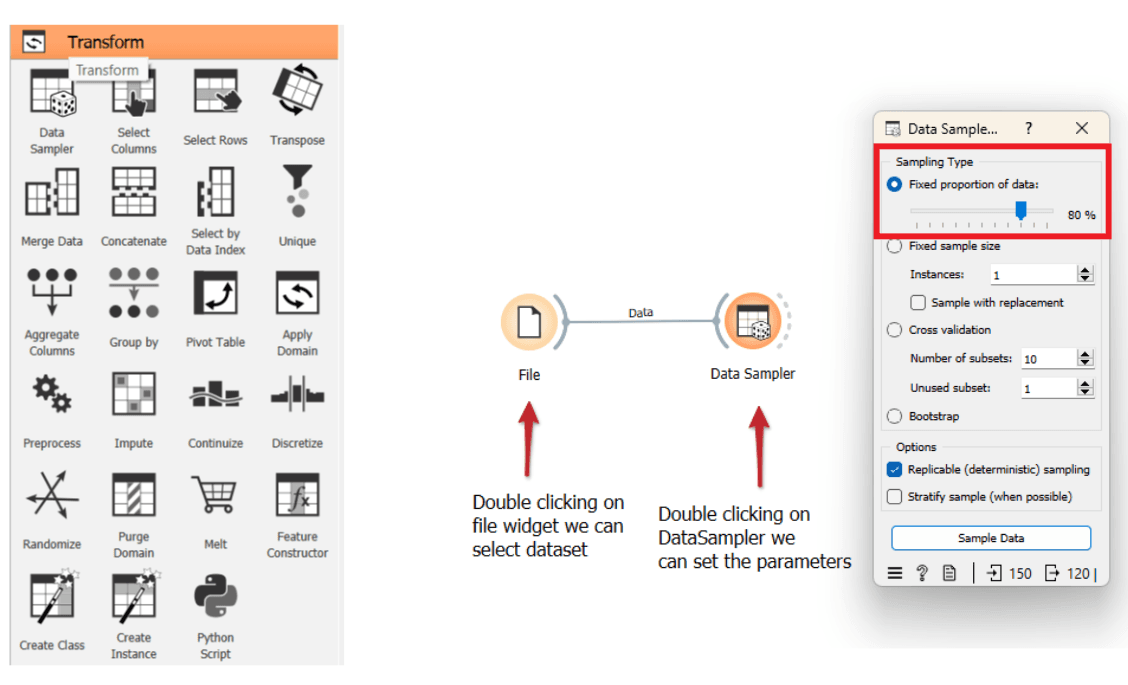
Split Data: Divide your data into training and testing sets using the "Data Sampler" widget found in the "Transform" tab.
splitting data lowcode nocode
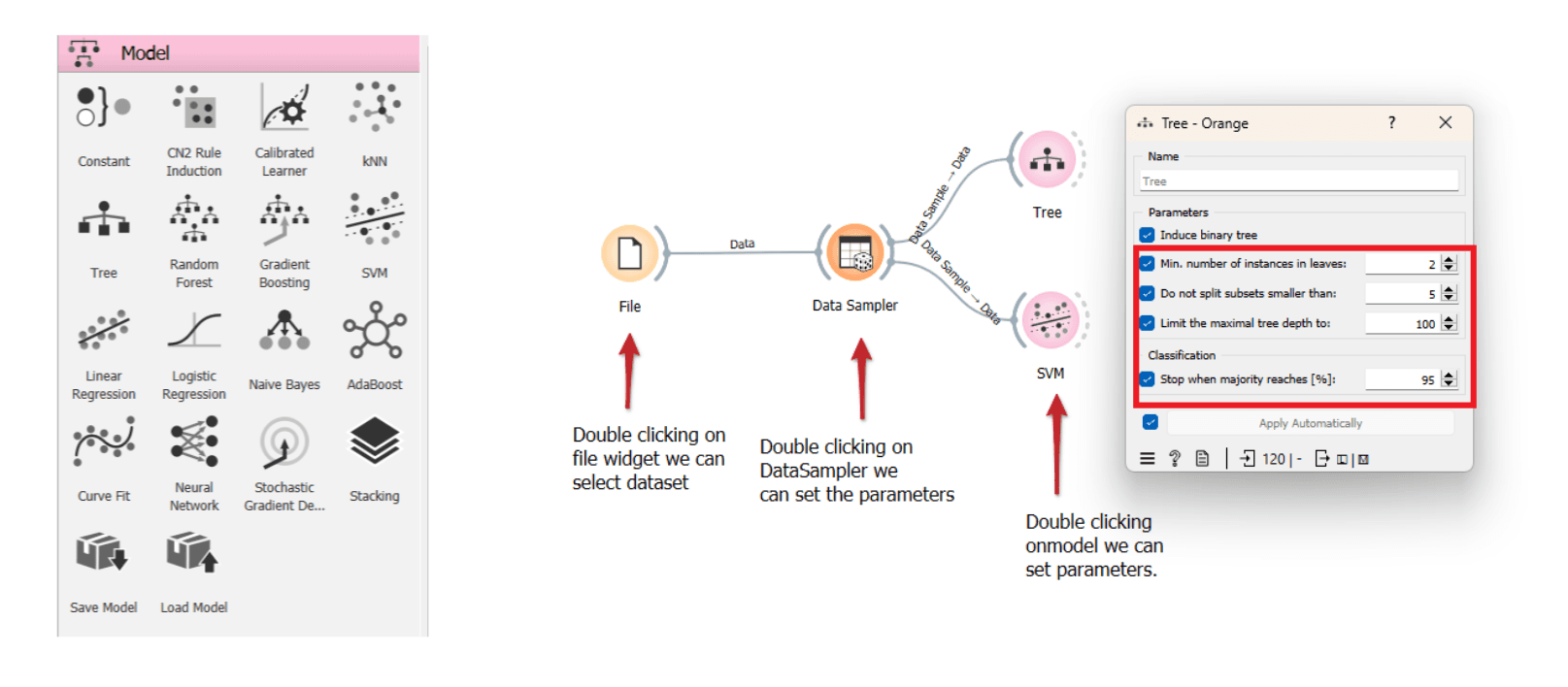
Model Selection: Select machine learning models from the "Model" tab, such as decision trees, SVMs, k-nearest neighbours, linear regression, or random forests.
Model selection no code low code
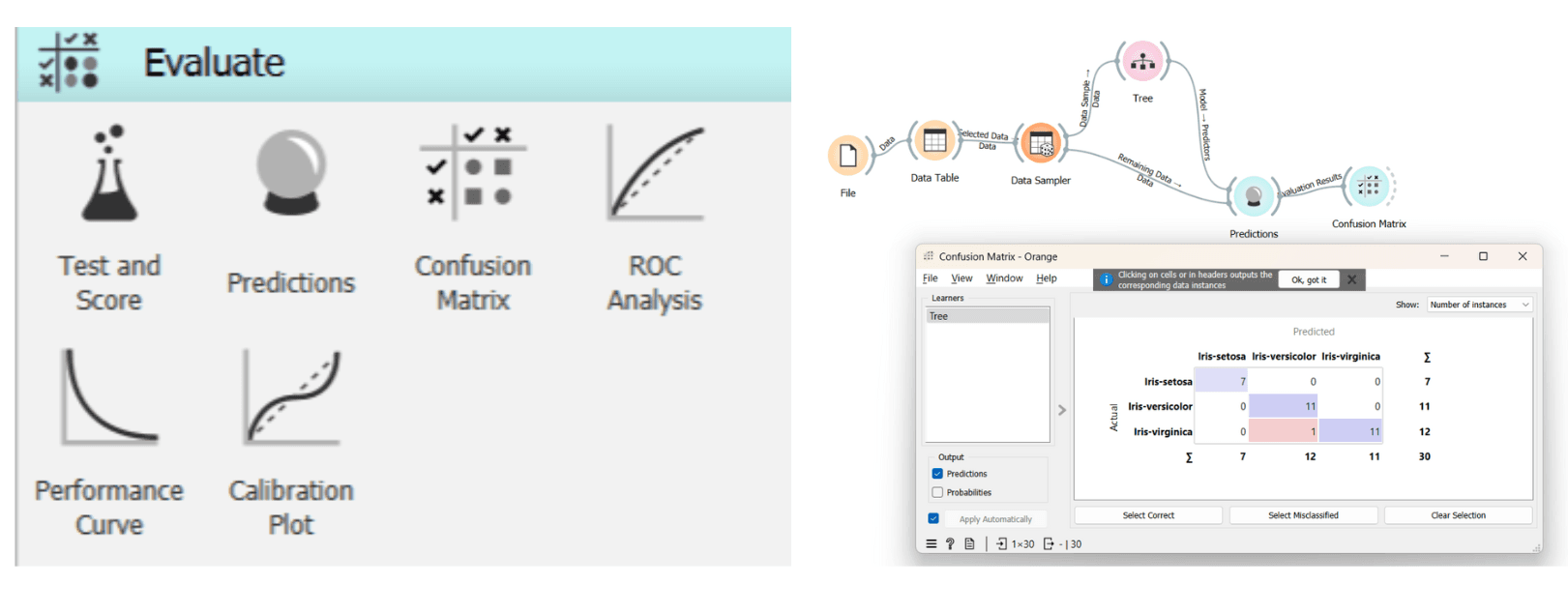
Evaluate Models: Use evaluation widgets like "Test and Score," "Confusion Matrix," and "ROC Analysis" to assess your models.
Evaluation no code low code
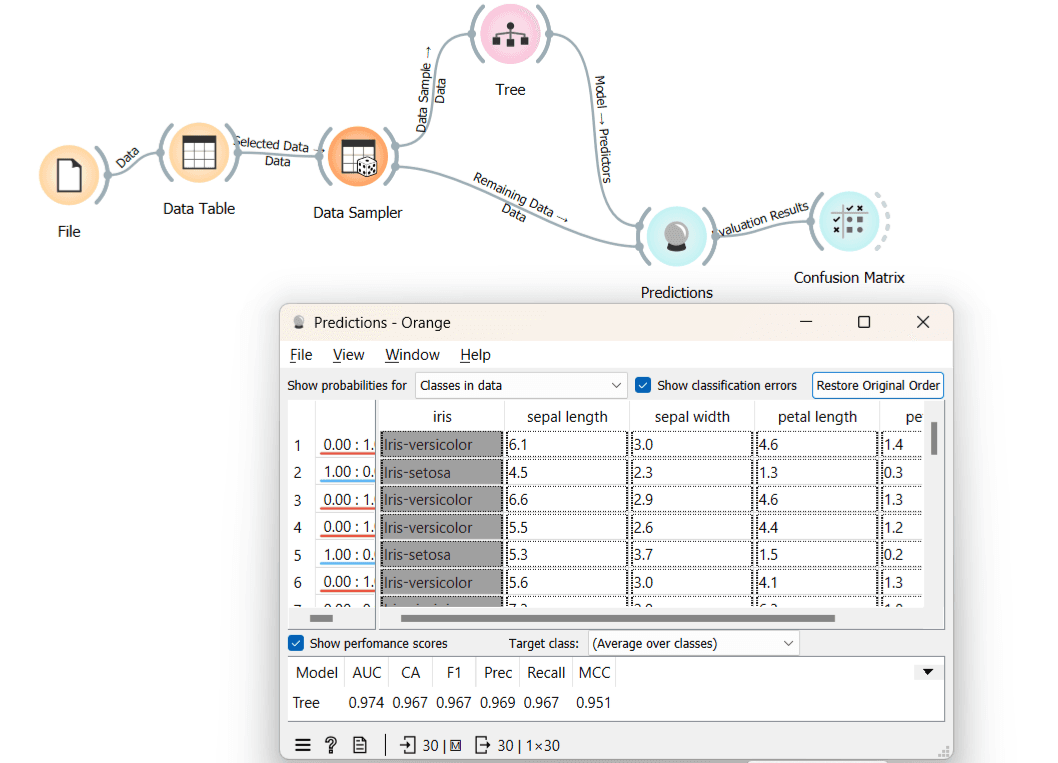
Predictions: Make predictions using the "Prediction" widget in the evaluation section.
simple prediction dataflow:
Prediction no code low code
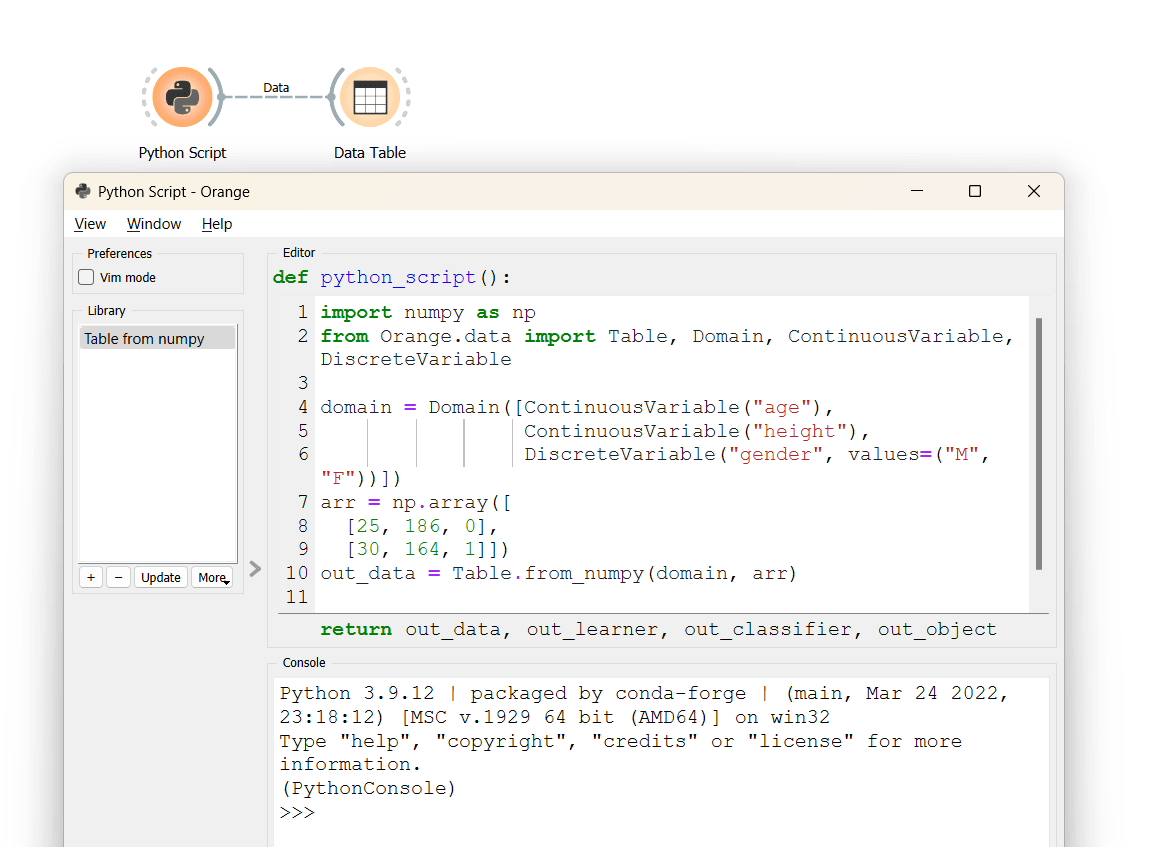
Incorporating Python Script: Add custom Python scripts by selecting the "Python Script" widget from the "Transform" tab. Replace existing code and run your script within Orange.
Python script low code no code
Low-Code/No-Code solutions and tools like Orange are democratizing technology and data analysis. They empower individuals across different domains to create applications and extract valuable insights from data without extensive coding expertise. As businesses continue to evolve, these user-friendly tools will play a crucial role in staying competitive and agile in the digital era.
DISCOVER MORE. CONNECT WITH US!

Intrigued by what you have read? Dive deeper and stay ahead with the latest insights and trends. We are here to answer your questions and help you explore further.