Back
ML Infra, Classifiers & RL

PRODUCTIZING ML MODELS

Author
Pfactorial
June 28, 2024
Share
Productizing ml models introduction
Introduction
Many people in the Data science community know how to build  a machine learning model.But the model is not useful when it is stored on their laptops.The model is useful for a company and a customer only when it is a product.Here comes the  question “how to productize an ml model?”.In the context of machine learning, productization means making a model available to the public in a user-friendly way and making revenue out of it.
The best example for this is OpenAI’s chatGPT, as  the company generates revenue by providing apis to access their large language models for a price.
In the next section let’s understand the steps involved in the productization of a Machine learning model.
Use Cases
Easy to train on new data : Once an ML model is deployed on a service like amazon sage maker . It is easy to automate the process of training on new data using an automated pipeline
Anomaly detection : A productized ML model  for detecting unusual network traffic can prevent cyber attacks.
NLP : Chat GPT is an example for a productized ML model in the NLP field.
Healthcare : ML models trained for medical image Analysis can be productized for use in hospitals.
Weather prediction : Continuous training of an ML model at regular intervals using input data from a weather API  using a training pipeline in a cloud platform
How to productize?
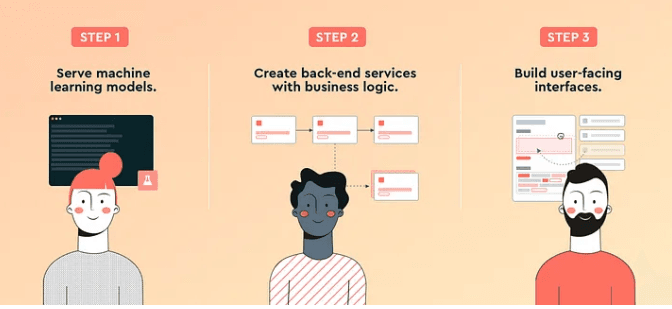
There are two approaches for creating a model. One is building a model from scratch .Most of the time this requires a lot of hardware resources and hence results in more expense, especially if it is a deep learning model. The other approach is to use an existing model and fine tune it with our own custom data to suit for the product’s needs. This is  one of the most widely used approach by companies. After creating the model, we need to create the backend logic for handling the inputs from customers. For instance if it is a Large language model (LLM) for text generation the input will be in the form of text. The inputs will be coming as post request through an api endpoint  containing the input . The backend logic is to process this input, pass it to the model and return the output from the model to the user. This can be implemented using a variety of web frameworks like fast api, django, flask etc.
For the users to interact with the model and see the results from the backend there should be a user interface. This can be implemented in either vanilla javascript or using javascript frameworks like react, angular etc. This part is crucial for the company since more complex UIs can disappoint the users and they may even stop using the product.
Isolating the app in an environment with all its dependencies helps in deploying our ML product in any environment. We can deploy the docker image on different cloud platforms like aws sagemaker. Dockerization helps in storing different versions of your model and switching between them easily.
We  can deploy the model on MLops platforms like AWS sagemaker which provides end to end MLops solutions.ML models are often fine tuned on new data. For this purpose DVC (Data version control) can be used.
Challenges
Integration : Integrating a productized ML model with existing systems can be complex. It requires both software engineering and machine learning skills.
Scalability : Building architecture to deploy the model and handling large amounts of requests can be a challenging task.
Cost Management : Deploying and maintaining ML models can incur significant costs, both in terms of infrastructure and human resources.
Productizing your own model
We are going to implement a recipe name generator model. The model will take the image of a food and output the name of the food. We will be using a pretrained model Salesforce/blip-image-captioning-base model which is used to generate caption for a given image and fine tune it with our own custom food images
Loading the dataset
Our dataset contains recipe images with image names as the name of the recipe. Create a custom dataset class for loading the images using pytorch.
Dataset format :
dataset productizing ml model
Dataset class
Here we pass the two parameters to the function, the path to the dataset and processor of the model which is used to process the input image and apply the preprocessing steps like resizing to a uniform size .The class returns the text encodings ,image pixels and attention mask  as a dictionary
Store the model and the processor in two variables
Data loader
Create an instance of the ImagecaptioningDataset and create a Data loader to iteratively access the data. Here on each iteration the data loader will return the encodings of 5 images since we specified the  batch size 5.

Training
Here we fine tune our pretrained model for one epoch with a batch size of 5.Here a small amount of data is used to finetune the model ,so the results are not perfect. The input ids are the encodings of the image name and pixel values are pixel values of the image and attention mask contains 0s and 1s which helps the model in identifying padded values and avoids them during training. The model learns from its mistakes in predictions and minimises the errors using an optimization algorithm known as gradient descent. After training the model is saved with the extension ‘.pth’
Building user interface
Let’s build a minimal user interface for our model using streamlit
model_util.py file containing code for loading the saved model and function for returning the generated caption for the image
streamlitapp
app productizing ml model
Dockerization
For dockerizing the project we need to create a Docker file in the project directory like this:
The first line specifies the version of python we want to use in our docker image. Then a working directory is created .After creating the working directory the dockerfile installs the third party packages which are not built into python using the requirements.txt file. All the file in the working directory are copied to the app directory and the port 8501 is exposed since streamlit runs on port 8501.Then the code for running a streamlit app is executed.
Building and running the docker file
After building the docker file we need to build a docker image.
Command for building the docker image
docker build -t recipe_model:0.1
Command for running the image
docker run -p 8501:8501 recipe_model:0.1
After building the run command the app will start running on your local host

In this blog you have explored the steps and a simplified overview of productizing an ML model. The ML model productization is a vast topic and we have covered only a small portion of it. Hope everyone learned something new from the blog .Happy learning !

DISCOVER MORE. CONNECT WITH US!

Intrigued by what you have read? Dive deeper and stay ahead with the latest insights and trends. We are here to answer your questions and help you explore further.