Back
OCR & Document Extraction

LLMs to extract structured data from text

Author
Pfactorial
July 01, 2024
Share
LLM network
Introduction
LLMs are incredibly versatile tools for working with language, enabling computers to understand and generate text in a way that is very similar to how humans do. They are particularly valuable for automating language related tasks and improving human-computer interactions.
Language models have revolutionized the natural language processing tasks, enabling machines to understand and generate human-like text. Beyond text generation and classification, LLMs like GPT-3 and its successors have proven their mettle in data extraction from unstructured text.
Why Use Language Models for Data Extraction?
Traditional data extraction methods rely on handcrafted rules and regular expressions, making them inflexible and prone to errors when dealing with varied textual formats. LLMs, on other hand, can comprehend the context and semantics of the text, adapt to different formats, and produce structured data with high accuracy.
The recent widespread popularity of Large Language Models has opened up new avenues in how we interact with and analyze data. Their ability to understand and generate human-like text has made LLMs incredibly versatile tools applicable to a growing pool of use cases. However, when it comes to extracting structured data from text, LLMS face a unique set of challenges
LLMs are traditionally designed to handle text data. This puts them at a disadvantage when trying to extract structured data from text. They often struggle to capture the underlying context, identify patterns, or infer relationships among entities represented by a schema.
Despite these challenges, existing LLMs are still powerful enough to bridge the gap between text inputs and structured data if we have the right tools. Kor, a simple library written on top of the Lang Chain framework, is one such tool that can ease the pains of LLM-aided data extraction.
What is Kor and how does it support data extraction?
“Kor is a thin wrapper on top of LLMs that helps to extract structured data using LLMs.”
Kor is a Python library that comes with built-in support for extracting structured data from data using LLMs. It adds the following functionality on top of an LLM to help with data extraction.
  • Support for defining data schema with type definitions, field descriptions, and extraction examples.
  • Provide in-built extraction prompt. It also supports adding custom prompts.
  • Use CSV or JSON data encoders to convert data.
  • Validate extracted data according to schema
  •  Handling extraction errors
Introduction to Generative Models, LangChain & Kor:
The use of generative models is growing in popularity. These models, such as GPT, can accurately generate text that resembles human writing when given a prompt. This makes them highly beneficial for various applications based on information extraction, question-answering text, summarization, etc.
LangChain is an open-source platform that simplifies developing applications using language models. Their reusable components and integrations to external data enable users to build pipelines for complex applications quickly. Kor is a library built on LangChain that helps extract text from unstructured and semi-structured data into a custom-structured format
The data extraction task involved a complex schema with deeply nested layers. The LLM still had trouble understanding how to identify certain entities in text and occasionally sent data in invalid formats.
But with the help of Kor, the  prompt and schema to receive more accurate results without much effort. Its support for adding field descriptions and examples proved to be the biggest difference when it comes to improving accuracy.
Kor’s extraction flow is built on top of LangChain’s LLMChain and output parsers. However, it still provides some improvements over LangChain’s native output parsers.
Simple data extraction with Kor
The most important step of running a data extraction task is defining the schema. Kor comes with built-in support for creating a schema “object” with fields of different types. Currently, Kor’s native support is limited to Object, Text, Number, Bool, and Selection input types.
What sets Kor apart when creating schemas for LLMs is its ability to define a field’s purpose and context with textual descriptions and examples. It enables the LLM to understand certain nuances in the extraction task and learn how to handle tricky scenarios.
Kor allows us to define a descriptive schema and use a LangChain LLM chain to extract information about tourist destinations from this text with a code like this.
Here, OpenAI’s GPT-3.5 Turbo model acts as the LLM for the extraction task. It is then passed to Kor’s create_extraction_chain method to generate a LangChain LLMChain. Finally, we can use this chain to predict and parse the extracted object
Kor vs. LangChain
LangChain is a framework that provides simplified abstractions over LLMs for different use cases. It also comes with several output parser classes that can handle data extraction tasks. So, how does Kor differ from these in-built parsers in LangChain?
Structured Output Parser and Pydantic Output Parser are the two generalised output parsers in LangChain. But their functions are not quite the same as what Kor offers.
  • The main difference between Kor and Structured Output Parser is how Kor supports providing examples with the schema.
  • Even though Pydantic Output Parser inherits Pydantic’s in-built support for providing field-level examples, the parser itself is not developed to use these examples to present them as few-shot examples in the extraction prompt.
  • LangChain parsers also bundle JSON decoding errors and extracted data validation errors under the same OutputParserException class. This may not be ideal for those who want to handle validation errors separately, such as prompting a user to provide more information. Kor’s implementation, on the other hand, ensures we have the freedom to handle validation errors however we want.
  • Kor also lets us change the encoder used for encoding examples and decoding predicted output. It comes with two in-built encoders, CSV and JSON, and even allows using our own encoders for the task. LangChain, on the other hand, uses only JSON for encoding.
With the ability to add examples, Kor provides a massive improvement over Structured Output Parser and Pydantic Output Parser for reducing hallucinations and increasing the schema’s understandability. However, you’ll still find cases where LangChain might prove to be the better option since Kor’s still in its infancy in terms of supported features
Limitations of working with Kor
  • One of the biggest limitations using Kor is its inability to persist past data in memory. While memory is not needed for a one-time extraction task, if it involves something iterative, such as prompting a user to provide the information required to fill the schema, this becomes a problem. Considering how LangChain already supports memory storage, its output parser gets an edge over Kor in tasks like this.
  • As of now, Kor also doesn’t support retrying requests to the LLM if a JSON decode error occurs. LangChain already supports this feature by allowing developers to combine a regular output parser with a Retry Output Parser.
  • Despite Kor’s helpful features, it is still prone to the downsides of current LLMs like hallucinations and misunderstanding context. While providing a diverse set of examples with the schema can reduce such errors in most cases, the responsibility of verifying the extracted data still falls in our hands.
Implementation
For complicated data extraction you need a robust library. The Kor Library is an awesome tool for this. Kor has a super easy interface for you to pass in a piece of text with a structures configuration output and get data out the other end
Why is this important? LLMs are great at text output, but they need extra help outputting information in a structure that we want.
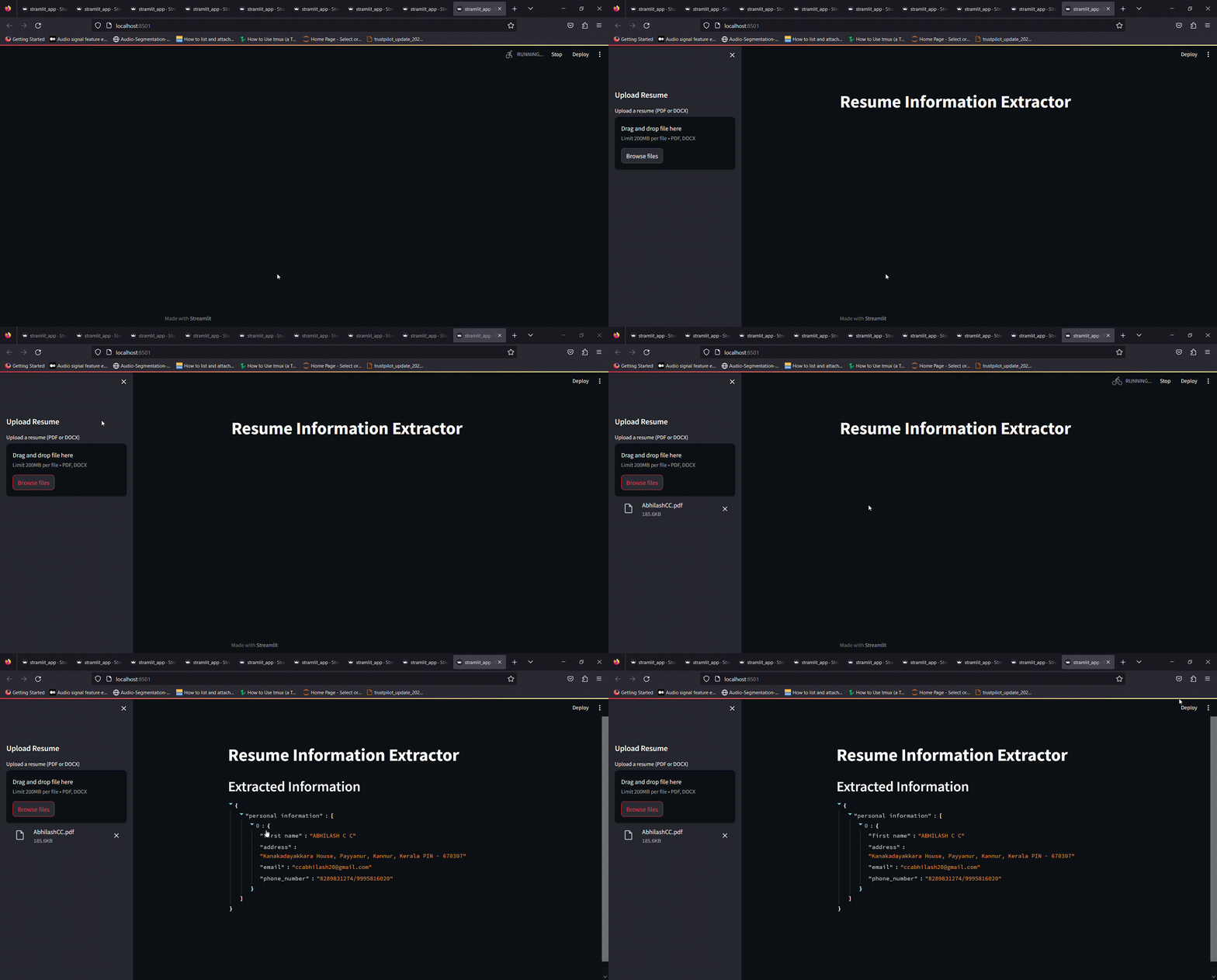
Here is  an LLM model (Resume Information Extractor) which would extract information like Name,  address,  email, phone number from the pdf resume we are providing. The LLM is built using the Kor library. This LLM is powered by the gpt 3.5 turbo model from Open ai. The following is the implementation of the LLM
schema for personal information extraction 
The  schema is  defined  as person_schema2 to instruct the model on how to extract specific types of personal information from text. This schema includes fields such as first name, address, email, and phone number along with example data for each field. The schema helps guide the model on what information to look for and how to structure the output.
Create an extraction chain and ● Run the extraction process
Set up an extraction chain using the create_extarction_chain function. This chain combines your language model (LLM) and the extraction schema (person_schema2) to perform the information extraction task.
The final output would be like this:
Resume extractor
Streamlit App
Finally, given a simple UI for this model, so that we can upload a resume which should be a pdf file, then the application would give the extracted json output.
Resume size limit
DISCOVER MORE. CONNECT WITH US!

Intrigued by what you have read? Dive deeper and stay ahead with the latest insights and trends. We are here to answer your questions and help you explore further.