Back
June 19, 2024
OCR & Document Extraction
Hyper Automating Invoice Processing (amazon)
Pfactorial
Share

Introduction
Invoices are the lifeblood of any business, but managing them can be a time-consuming nightmare. Manual processing is expensive and error-prone, leaving you drowning in paperwork. Luckily, there's a hero in this story: AI-powered invoice processing models! Get ready to learn how these innovative tools are revolutionizing the way businesses handle their finances.

Document extraction is the main feature of invoice processing. Extracting correct data is a crucial part of invoice processing. Many enterprises spend their valuable time and effort on this. We need a huge amount of data for creating a model for invoice processing and Proper training methods to be employed. Still the demand for perfect invoice processing models is high because of its vast real time applications.
Use Cases
Let's explore various applications of invoice processing, which has the potential to revolutionize multiple industries in the business world.
- Invoice Data Extraction : Automatically extracting key information from invoices, invoice numbers, dates, vendor details, line items, and amounts. This reduces manual errors and makes the process faster.
- Invoice Verification : we can cross-referencing the extracted data with expected values or historical data. This helps prevent overcharges, undercharges, and billing discrepancies.
- Account payable Automation : Automatically matching purchase orders, receipts, and invoices to facilitate the accounts payable process. This reduces manual effort and ensures timely payments to vendors.
- Data Analytics: Aggregating and analyzing invoice data to gain insights into spending patterns, budget forecasting, and cost optimization.
- Credit and Cash Flow Management: Managing cash flow by tracking invoice due dates and optimizing payment schedules.
The implementation of these use cases is driving an increased demand for invoice processing model, and it has become a game changer!
Let us discuss about the model :
Now we are going to discuss a model for invoice processing. Here we will be utilising the "layout-invoices" model from Hugging Face, which is accessible at the following link : https://huggingface.co/impira/layoutlm-invoices. This particular model is a fine-tuned variant of the multi-modal LayoutLM, specialised for question-answering tasks on invoices and various document types. It has been fine-tuned on a proprietary dataset of invoices. To put this model into action, we will be relying on the GitHub repository provided by Impira, which you can find here https://github.com/impira/docquery. This repository contains the necessary tools and resources for implementing and working with the "layoutlm-invoices" model.
Before implementing the model let us have a basic understanding of the architecture of our model.
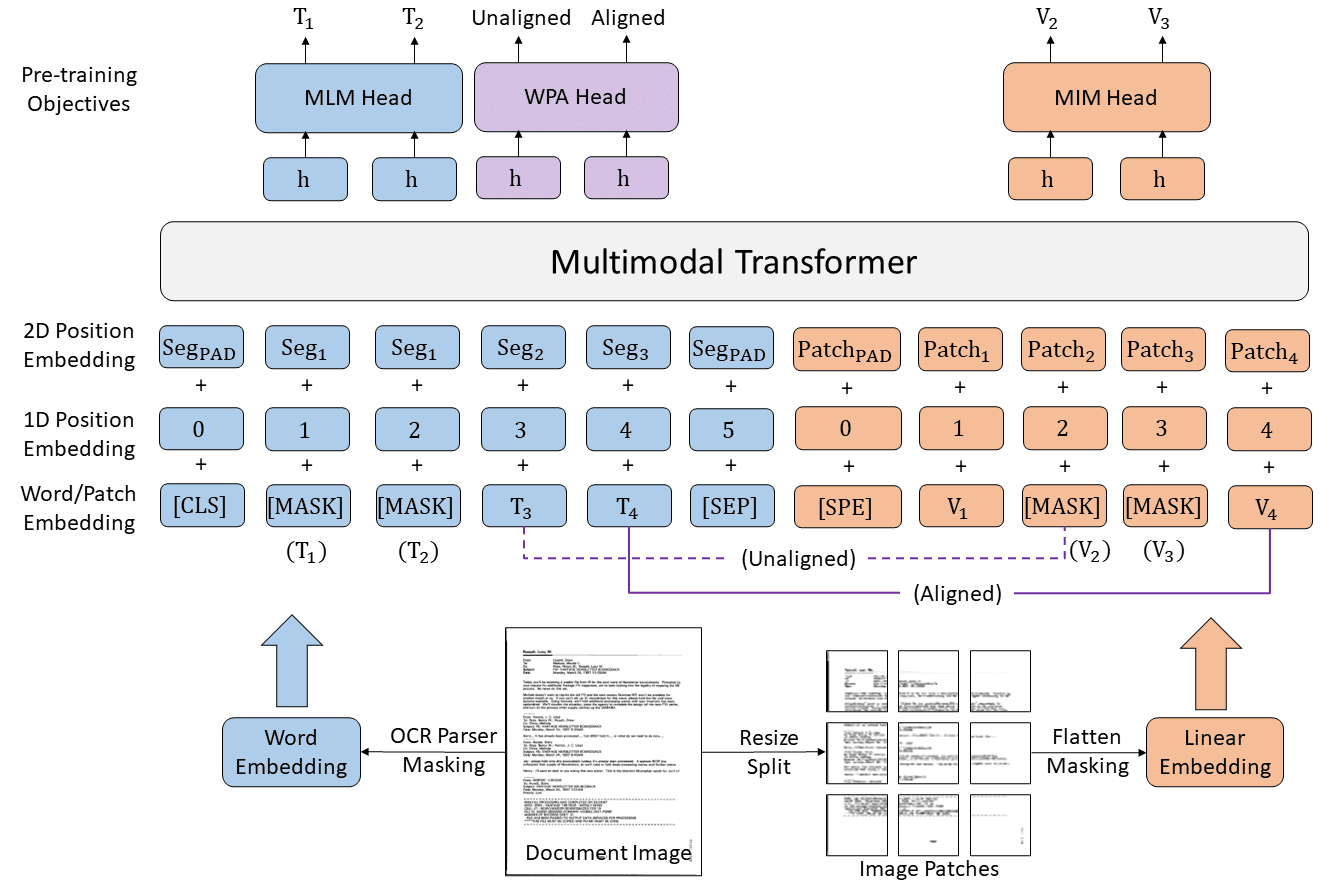
LayoutLMv3 is the latest version of LayoutLM model. In the figure below we can see a multimodal transformer . Input to this Multimodal transformer is a combination of text embedding and image embedding.

Text embedding is a way to represent text information, like words and their positions. To represent the words as a word embedding matrix, we used a pre-trained model RoBERTa.
Position embedding includes 1D and 2D positions. Here used an OCR toolkit to obtain textual content and corresponding bounding box information. Positions are just the order of words in the text. This helps to group words that are in the same part of the page and likely talk about the same thing. This is how the text embedding is created.
Next to process the image to create image embedding. Here we use a typical vit style image patching to train the model. Image is split into uniform patches. Then project the image patches to dimensions and flatten them into a sequence of vectors. Now image vectors are created. These are the inputs to the multimodal transformer.
LayoutLMv3 is pre-trained with three pre-training objectives: MLM ,MIM and WPA .
Masked Language Modeling(MLM) : Masking text and trying to predict it. This objective helps the model to learn the similarity between layout information and text and image context.
Masked Image Modelling (MIM): It helps models to extract visual content from text and image representations.
Word Patch Alignment(WPA) : This is about finding the alignment of image and text correctly. Here it is a binary classification problem , they teach the model to find the connection of image to text. This is done by giving labels to masked image and masked text pairs .
Hope you get a general idea of the model.
How to implement the model
To begin, let's install the Transformers library with the particular version required, as our model is designed to operate with Transformer version 4.23.
Next we need to install the DocQuery library . DocQuery is a library and command-line tool that makes it easy to analyze semi-structured and unstructured documents (PDFs, scanned images, etc.) using large language models (LLMs). DocQuery is created by the team at Impira.
We can install DocQuery by simply running the code
!pip install docquery. This will install the command line tool as well as the library. Next install the tesseract library. Here in invoice processing we need to run OCR on images . This package contains an OCR engine - libtesseract and a command line program - tesseract.
Now the prerequisites are completed and we are ready to run our model. By utilizing the "DocQuery scan" command, we can extract specific information from an invoice. To do this, we formulate questions to guide the extraction process. For instance, we might ask questions in this way
!docquery scan "What is the Invoice Number?" /content/1693544889.webHere we are going to use this amazon invoice .


We have the flexibility to provide documents in the form of images or PDF files. Furthermore, we can pose one or multiple questions for analysis on a single document or an entire directory of files. In the case of PDF documents, there's an additional prerequisite: we must install "poppler." This can be accomplished by using the following command:
Here i am going to give another amazon invoice

Here we can pass questions as a list as given above. And the answers to the questions are appended to a list.

The output list shown in the image above comprises information in the form of a dictionary for each question, including details such as the score, word ID, page number, and the answer. We can extract the answers from this dictionary and compile them into a new dictionary, associating each answer with a respective column name. This resulting dictionary can be transformed into a Data Frame and subsequently exported to an Excel file.


Invoice processing models represent a transformative step forward in the realm of financial and administrative operations. By automating tasks such as data extraction, verification, document classification, and compliance checks, these models contribute to the optimization of financial processes, from accounts payable to expense management and budget forecasting. The incorporation of invoice processing models reshape traditional business practices for the better.