Back
Legal & Contract Analysis

A Multi-Format Document Extraction Platform Built Around One OCR Contract

How Pfactorial Technologies built a full-stack OCR platform that normalizes images, PDFs, legacy Word documents and mixed ZIP archives into a single, reliable text-extraction pipeline.

August 21, 2026
Share
ENGAGEMENT SNAPSHOT

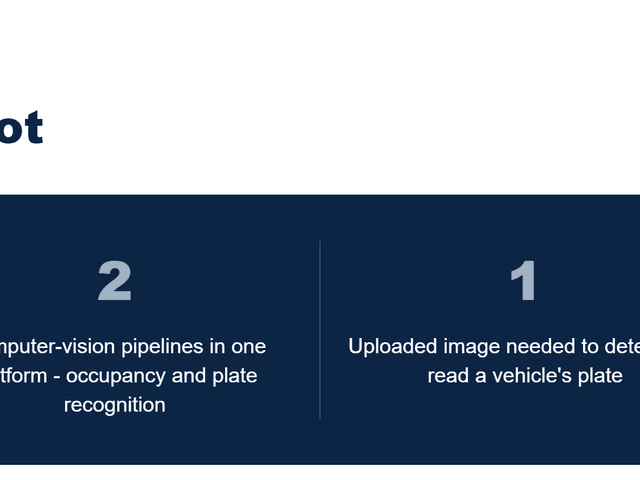
Pfactorial_Case_Study_OCR_Extraction_Platform image 1
Figure 1 - Key figures from this engagement, at a glance.
EXECUTIVE SUMMARY
Our client needed to extract text from large, mixed volumes of documents - scanned images, PDFs, modern and legacy Word files, and folders of files bundled into ZIP archives - without asking anyone to sort them by format first.
That requirement sounds simple until the formats stop cooperating. A scanned JPEG, a clean PDF, and a fifteen-year-old .doc file cannot be handed to a modern OCR API the same way, and a ZIP archive can contain any combination of all of them, including further archives nested inside. A script that works on a clean test set breaks the first time a real, messy upload arrives.
Pfactorial built a full-stack extraction platform - a React frontend and a Django backend - that normalizes every input format down to one of two payload types before it ever reaches the OCR model, converts legacy formats automatically, safely unpacks archives, and returns a consistent, page-wise text output regardless of what came in.
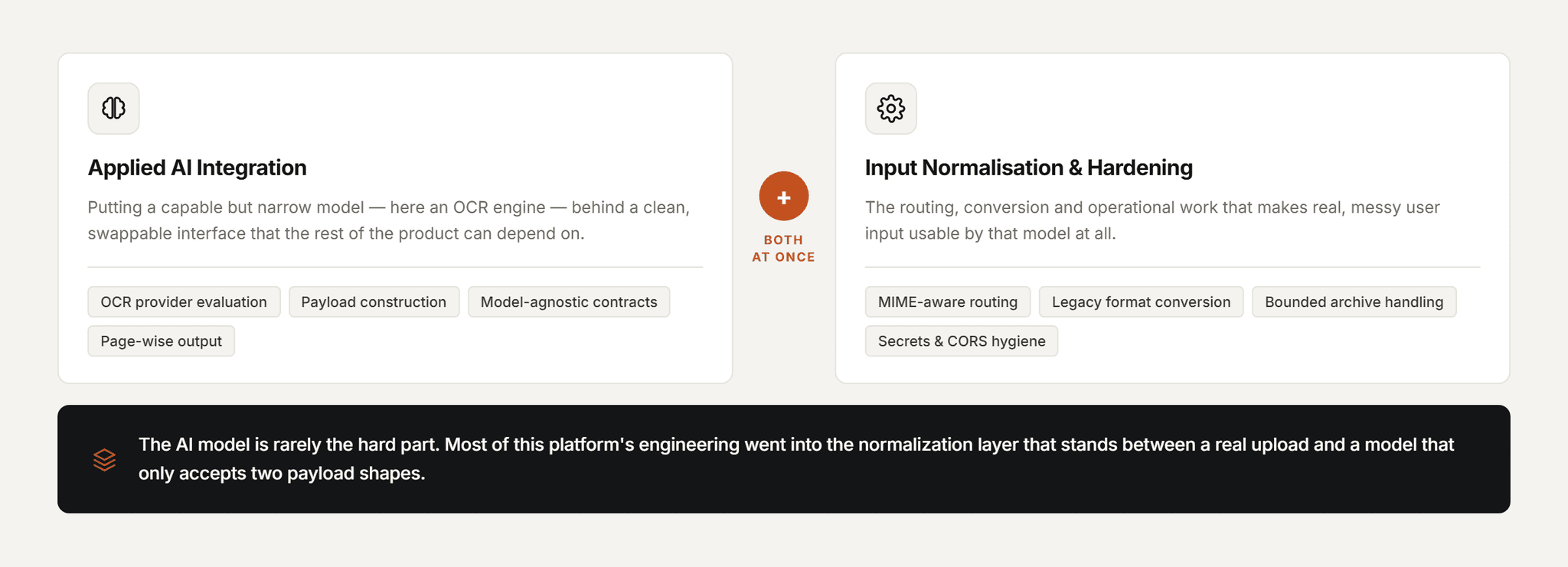
Why this engagement is representative This engagement is a clean example of a recurring Pfactorial pattern: the AI model is rarely the hard part. The hard part is the normalization and routing layer that makes real-world, messy input usable by that model at all - and that layer is where most of this platform's engineering effort actually went.
THE CHALLENGE
The client's product idea - upload documents, get text back - was simple to state and hard to make reliable once real documents started arriving. Four problems stood between the concept and a dependable pipeline.

1. Input never arrives pre-sorted

Users upload whatever they have - a photographed receipt, a clean PDF, an old .doc file, a folder zipped up for convenience - in whatever combination they happen to have on hand. A pipeline built around one format breaks the moment a different one shows up.

2. Legacy formats aren't OCR-ready

Modern OCR APIs accept images and PDFs cleanly, but a .doc or .docx file is not natively OCR-able - it has to be rendered to a document format first, accurately and without a licensed desktop suite running in a loop somewhere.

3. Archives hide arbitrary structure

A ZIP file is not one input, it's an unknown number of them, in unknown formats, potentially including more ZIP files nested inside. Naively extracting and processing everything found risks infinite recursion or silent failures on unsupported content.

4. Output has to be consistent, not just accurate

Downstream tooling and end users need extraction results in a predictable shape - page-wise, cleanly delimited - regardless of whether the source was a two-page PDF or the fortieth file inside a batch ZIP. Inconsistent output shifts the normalization problem downstream instead of solving it.
The real brief Not “integrate an OCR API” but “build the format-normalization layer that makes an OCR API usable against whatever a real user actually uploads.” The OCR call itself is a small, swappable piece of a much larger pipeline.
THE SOLUTION
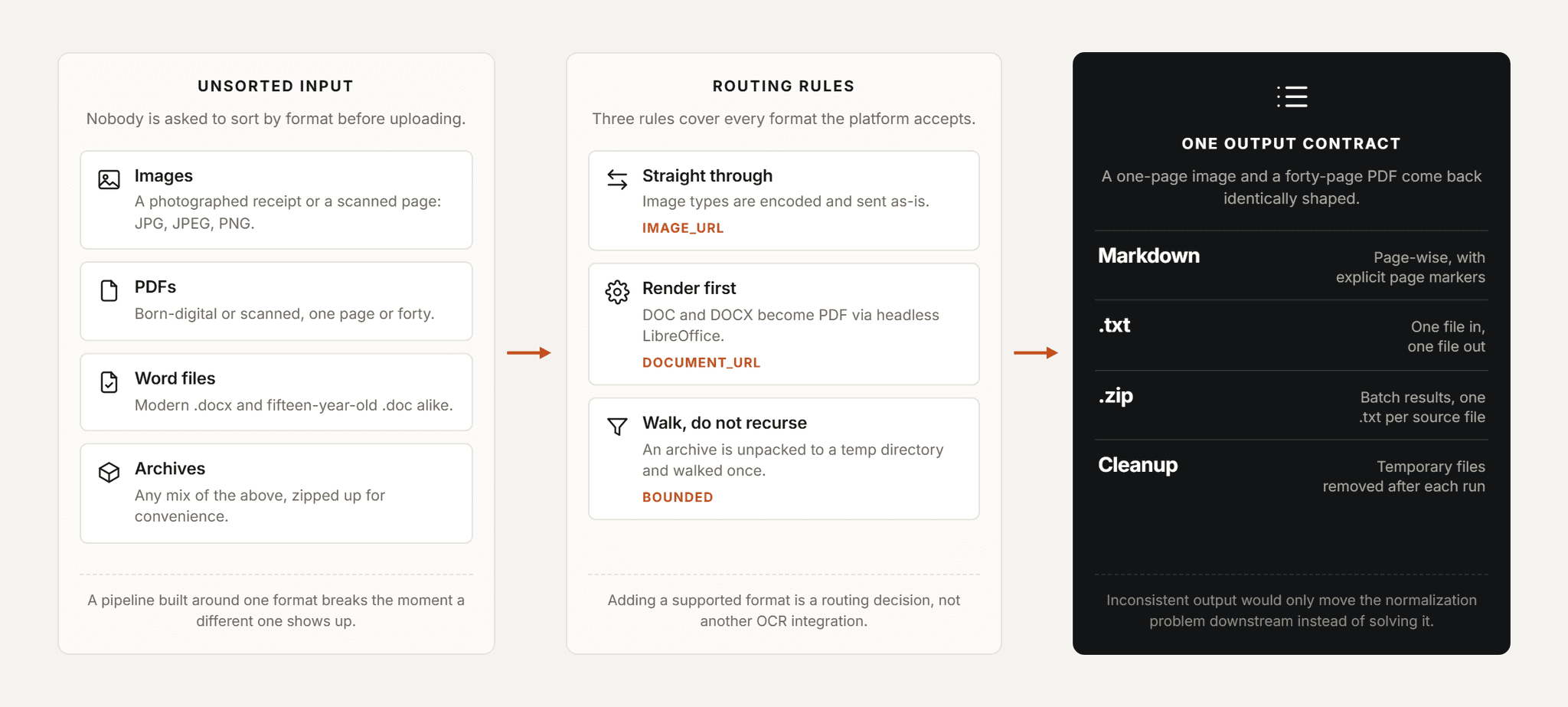
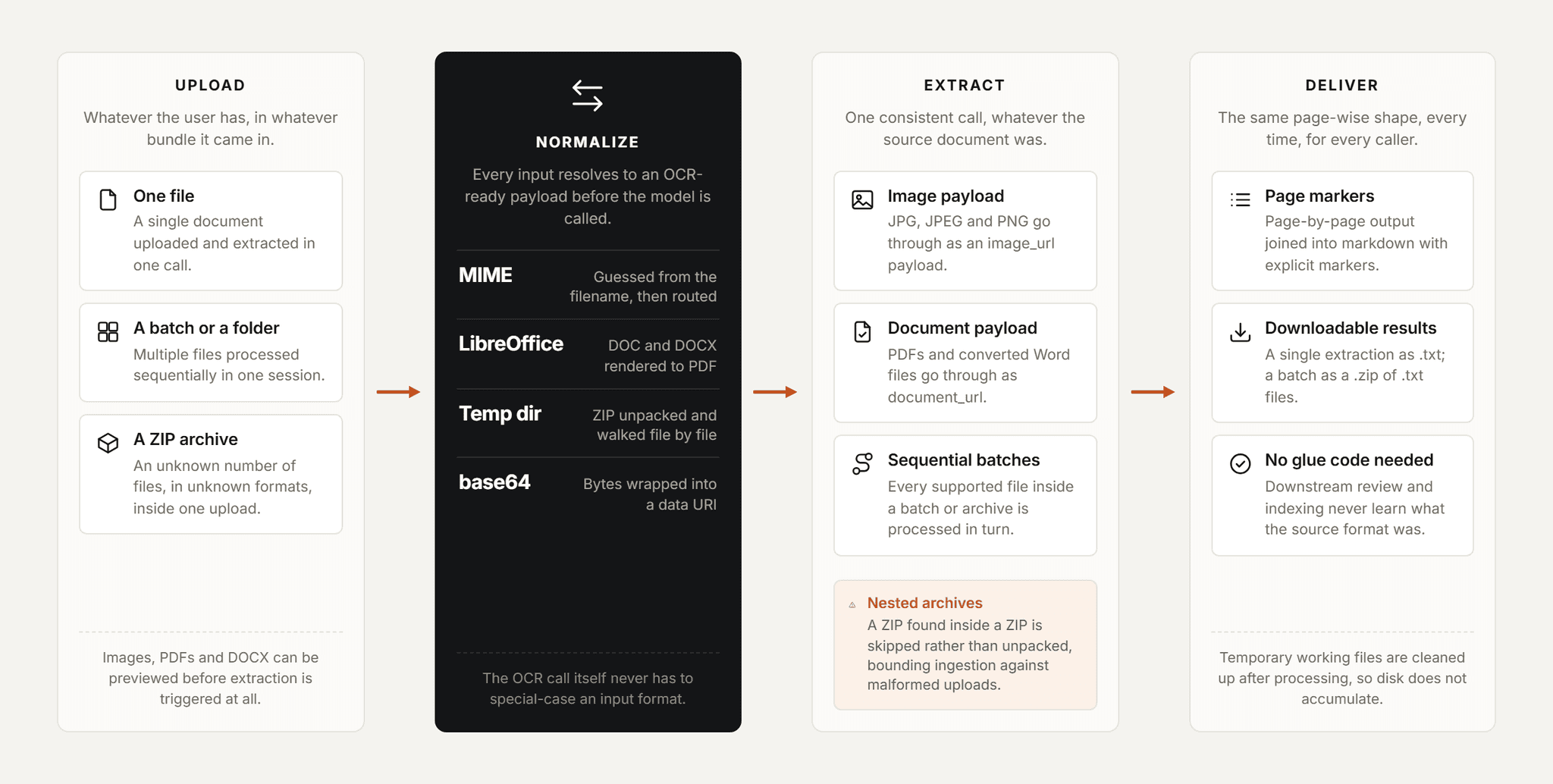
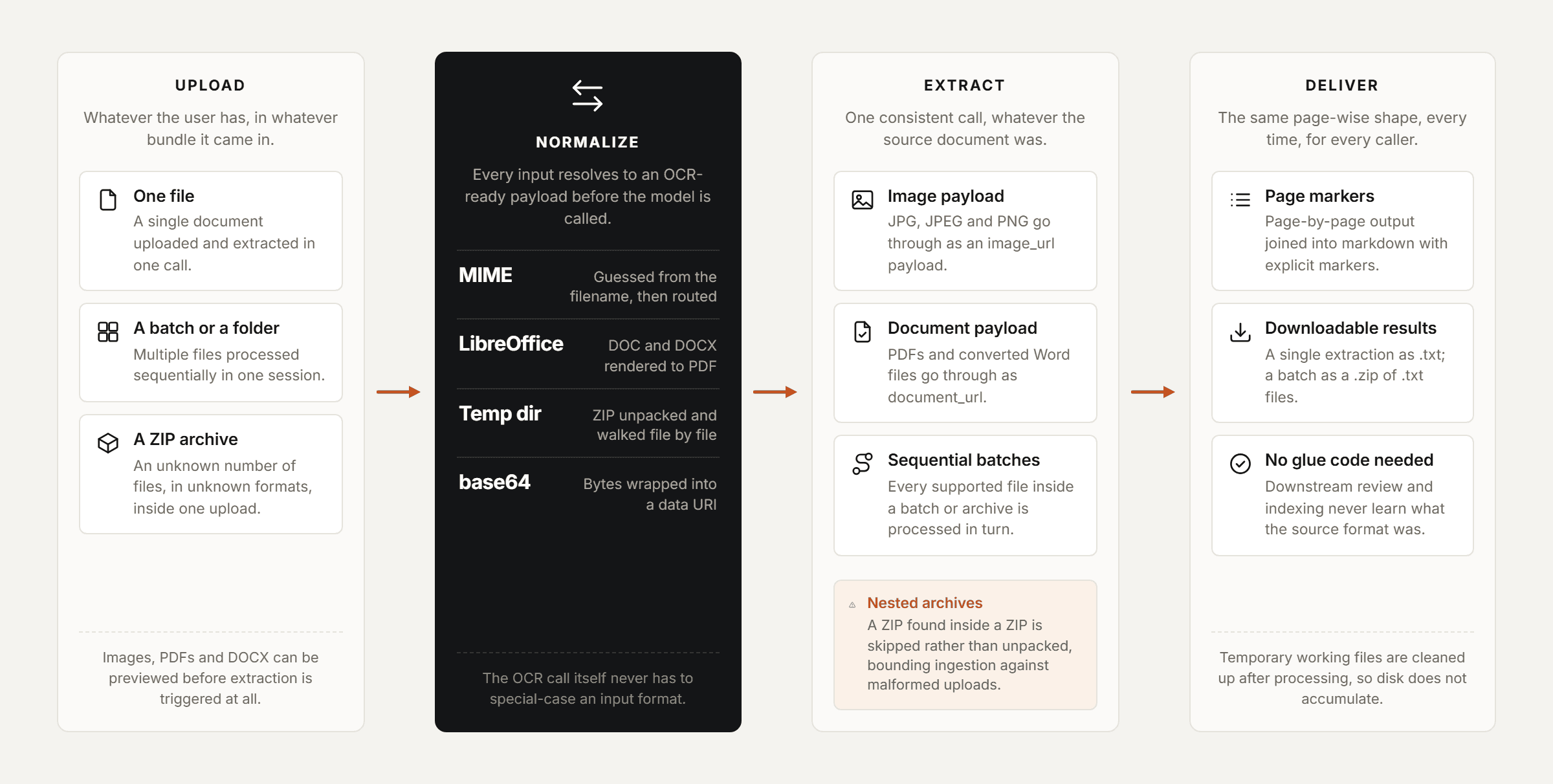
Pfactorial built the platform around a single principle: every input, no matter its original format, is normalized to one of two OCR-ready payload types before extraction - and every extraction result comes back in the same page-wise shape.
Pfactorial_Case_Study_OCR_Extraction_Platform image 2
Figure 2 - Upload, normalize, extract, deliver: the same pipeline regardless of input format.

Architectural principles

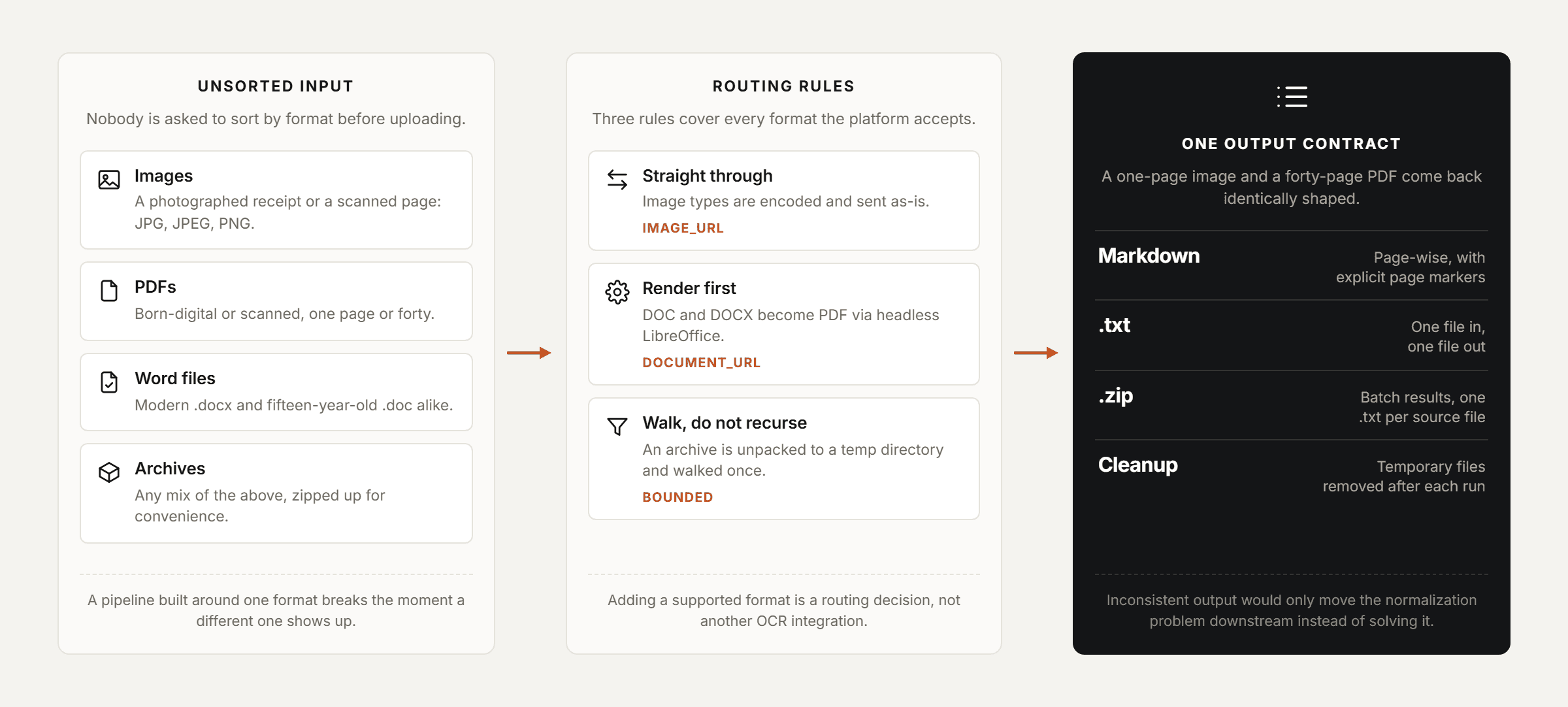
  • Format-aware routing - The backend detects each file's MIME type from its filename and routes it to one of two payload types - image_url for JPG/JPEG/PNG, document_url for everything else - so the OCR call itself never has to special-case input formats.
  • Convert before extract - Legacy .doc and .docx files are rendered to PDF via headless LibreOffice before they reach the OCR step, so the model always sees a format it handles natively and consistently.
  • Archive-safe ingestion - ZIP uploads are extracted to a temporary directory and walked file by file; any nested ZIP found inside is skipped rather than recursively unpacked, bounding the ingestion process against runaway or malformed archives.
  • One output contract - Every extraction - single file, batch, or from inside a ZIP - returns page-wise markdown with explicit page markers, so downstream consumers of the output never need to know what format the source document was in.
CAPABILITIES DELIVERED
Each capability was scoped to remove a specific manual step users would otherwise have to perform themselves before extraction could even begin.
CAPABILITY
WHAT IT DOES
Single-file extraction
Upload one file, extract its full text content through the OCR model in one call.
Batch extraction
Upload multiple files or a folder and extract every file sequentially in one session.
ZIP archive processing
Archives are extracted server-side and each supported file inside is processed individually.
Legacy format conversion
DOC and DOCX files are converted to PDF automatically before extraction, with no user action required.
Browser file preview
Images, PDFs and DOCX files can be previewed before extraction is triggered - DOCX previews render client-side with no server round-trip.
Downloadable output
Single extractions download as a .txt file; batch extractions package as a .zip of .txt files.
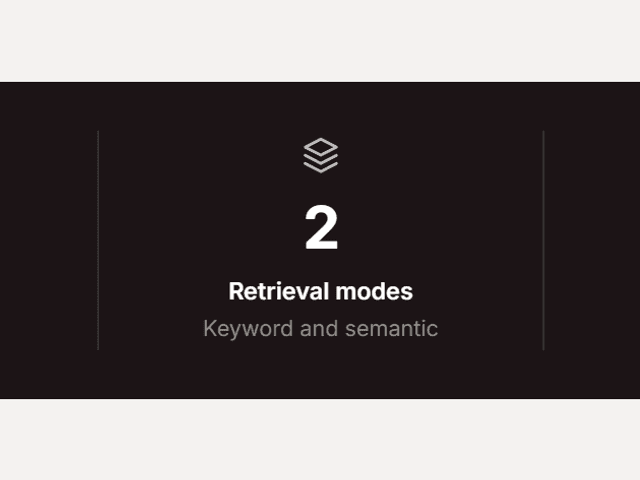
Pfactorial_Case_Study_OCR_Extraction_Platform image 3
Figure 3 - Whatever format arrives, it resolves to one of two OCR payload types.
Design note Routing every input to just two payload types, rather than writing a bespoke integration per file format, is what keeps this pipeline maintainable. Adding a new supported format is a routing decision, not a new OCR integration.
ENGINEERING FOR SCALE AND RELIABILITY
Getting text out of a clean PDF is the easy 80%. The remaining engineering went into the format edge cases and operational hygiene that decide whether the platform holds up against real uploads.

MIME-aware payload construction

File bytes are base64-encoded and assembled into a data URI, with MIME type guessed from the filename to select the correct OCR payload shape - image_url or document_url - before the call is made.

Headless document conversion

LibreOffice running headless converts DOC and DOCX files to PDF ahead of OCR, giving the model a consistent input regardless of how old or unusually formatted the source Word file is.

Bounded archive extraction

ZIP contents are extracted to a temporary directory and processed file by file; nested ZIPs are detected and skipped rather than recursed into, and temporary files are cleaned up after processing to avoid disk accumulation.

Client-side preview where possible

DOCX previews are rendered directly in the browser using a client-side text-extraction library, avoiding an unnecessary server round-trip just to show the user what they uploaded.

Consistent page-wise output

The OCR model's page-by-page response is joined into a single markdown-formatted result with explicit page markers, so a one-page image and a forty-page PDF return output in the same predictable shape.

Secrets and config hygiene

OCR provider keys and bot-protection secrets are read from environment variables and never committed to source control; debug mode and CORS origins are locked down for production deployment.
DELIVERY APPROACH
The engagement built outward from a working single-file extraction path, adding format coverage and batch handling once the core contract was proven.
1. Provider and format assessment - evaluation of OCR providers against the client's actual document mix, and a catalog of every input format the platform would need to accept.
2. Core extraction pipeline - Django backend with a single-file upload endpoint calling the OCR model directly for already-supported formats (images, PDFs).
3. Format normalization layer - MIME detection, base64 payload construction, and headless LibreOffice conversion for legacy DOC/DOCX input.
4. Batch and archive support - sequential multi-file processing and ZIP extraction, with nested-archive skipping and temp-directory cleanup.
5. Frontend workspace - React upload, preview, extraction and download experience, including client-side DOCX preview and ZIP packaging of batch results.
6. Hardening and deployment - environment-based secret management, CORS restriction, and Docker Compose packaging for frontend, backend and database services.
RESULTS AND IMPACT

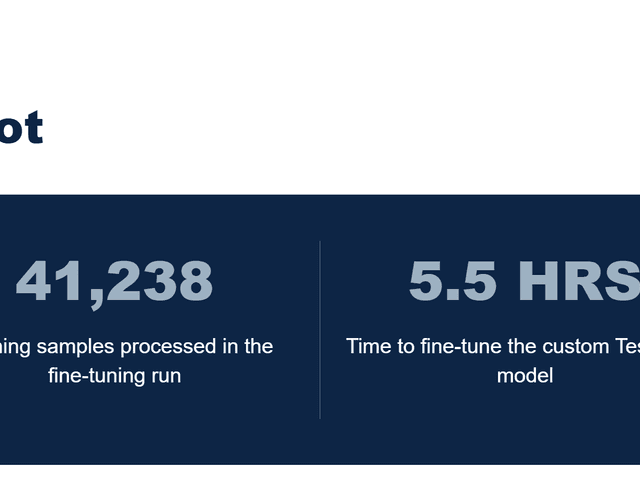
Pfactorial_Case_Study_OCR_Extraction_Platform image 4
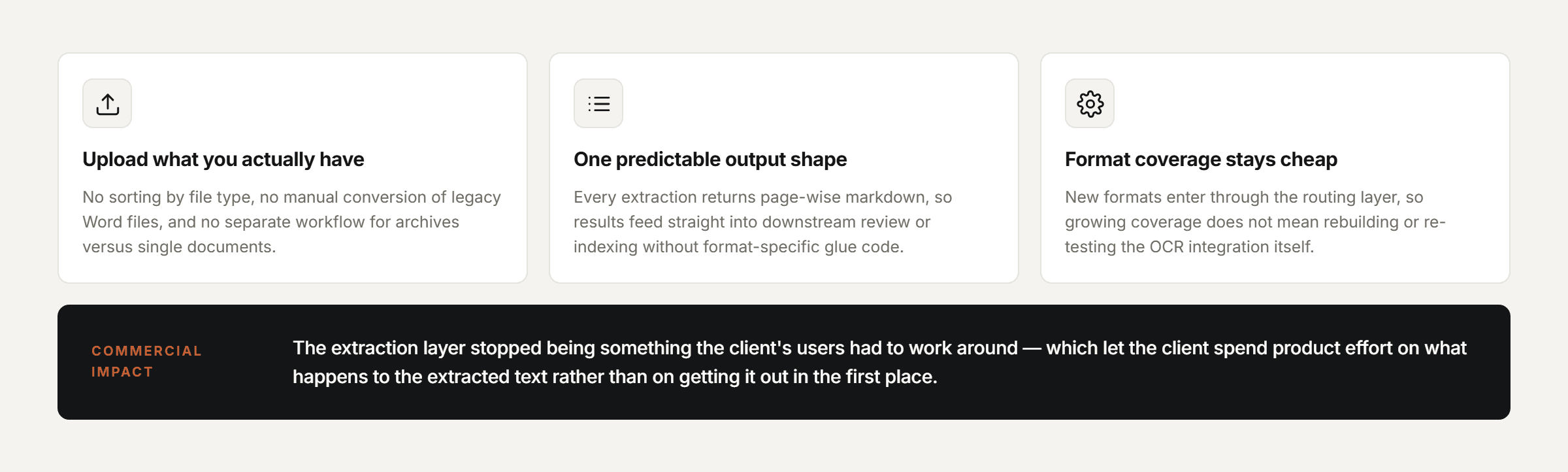
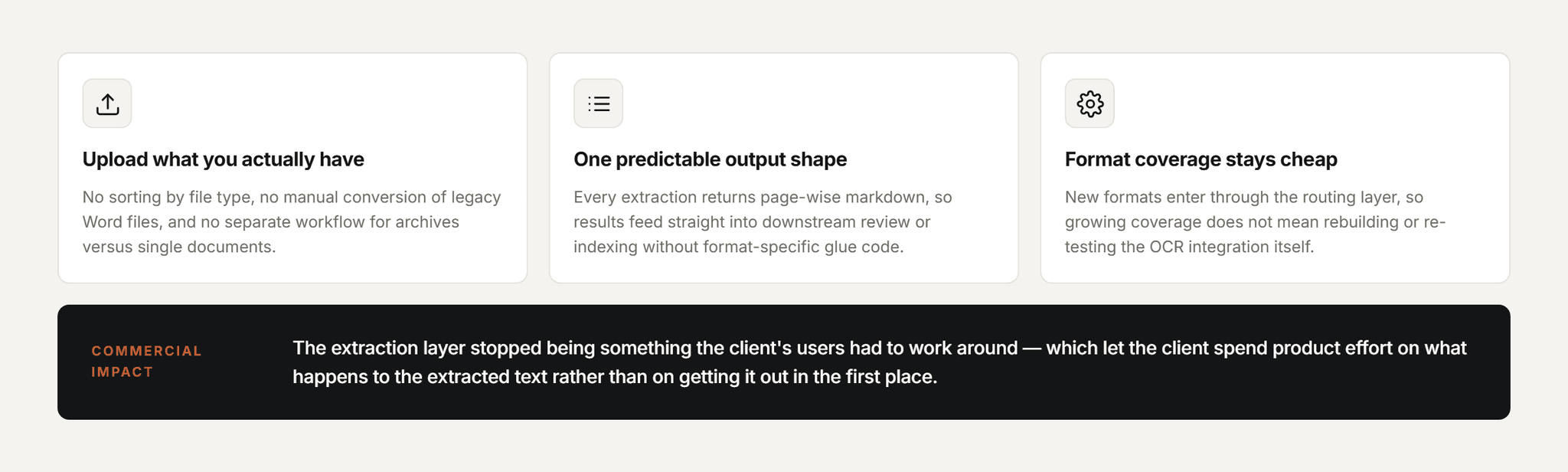
Figure 4 - Key outcomes from this engagement.
The client's users can now upload documents in whatever format they actually have them in - no manual conversion, no pre-sorting by file type, no separate workflow for archives versus single files.
Because every extraction resolves to the same page-wise output contract, results feed directly into downstream review or indexing workflows without format-specific glue code on the receiving end.

What it enabled commercially

The extraction layer stopped being something the client's users had to work around - upload whatever you have, in whatever bundle it's in, and get back text in a predictable shape. That let the client focus product effort on what happens with the extracted text, not on getting it out in the first place.
WHY PFACTORIAL
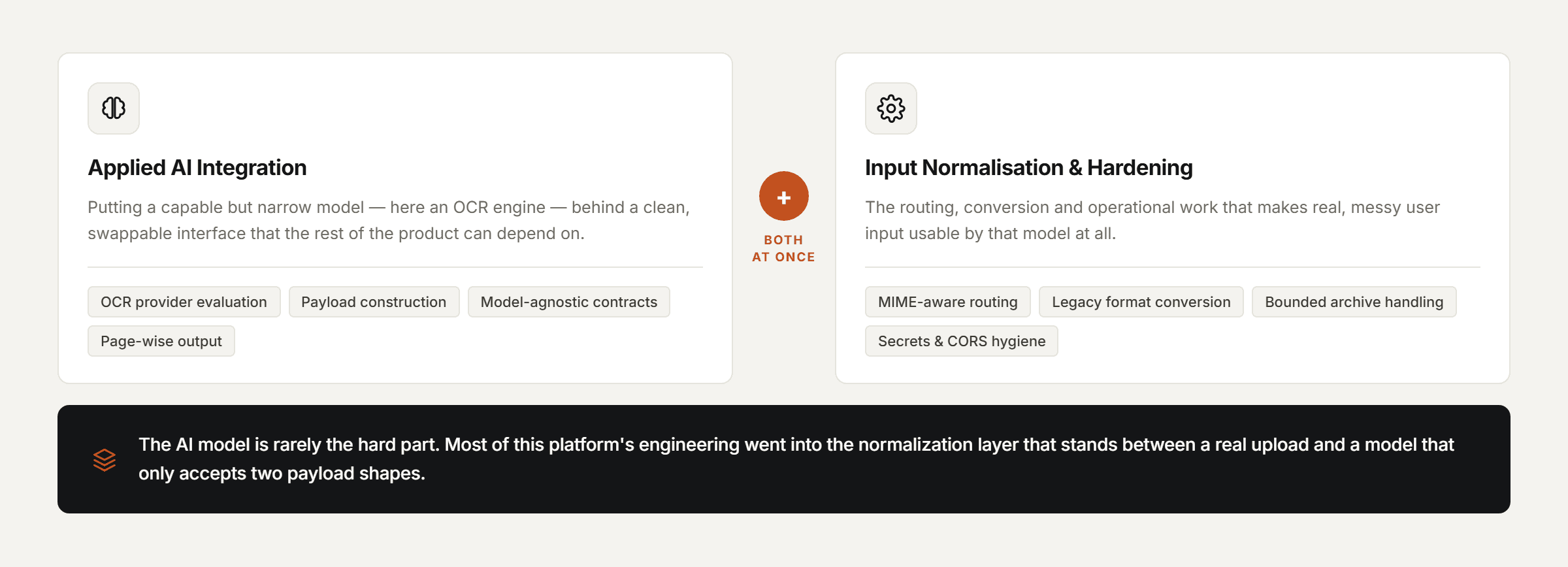
This engagement reflects a service line Pfactorial delivers repeatedly: wrapping a capable but narrow AI model - here, an OCR engine - in the format-normalization, validation and operational hardening that turns it into something a real product can depend on.
Pfactorial_Case_Study_OCR_Extraction_Platform image 5
Figure 5 - Service lines this engagement draws on.
Engagement enquiries Pfactorial Technologies works with teams that have a working AI model or API and a much messier real-world input problem sitting in front of it. If you're evaluating what it would take to make an AI capability reliable against real, unsorted user input, we're happy to give you an honest read on scope and risk before anyone commits to anything. · pfactorial.ai
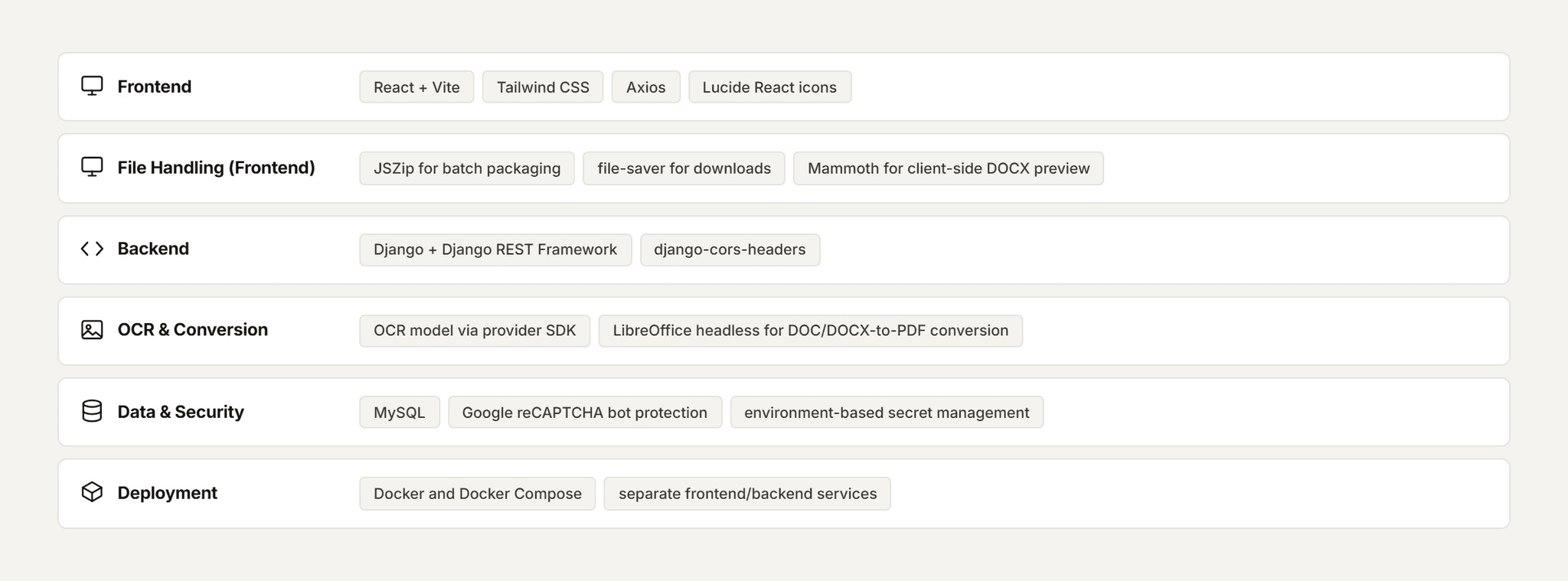
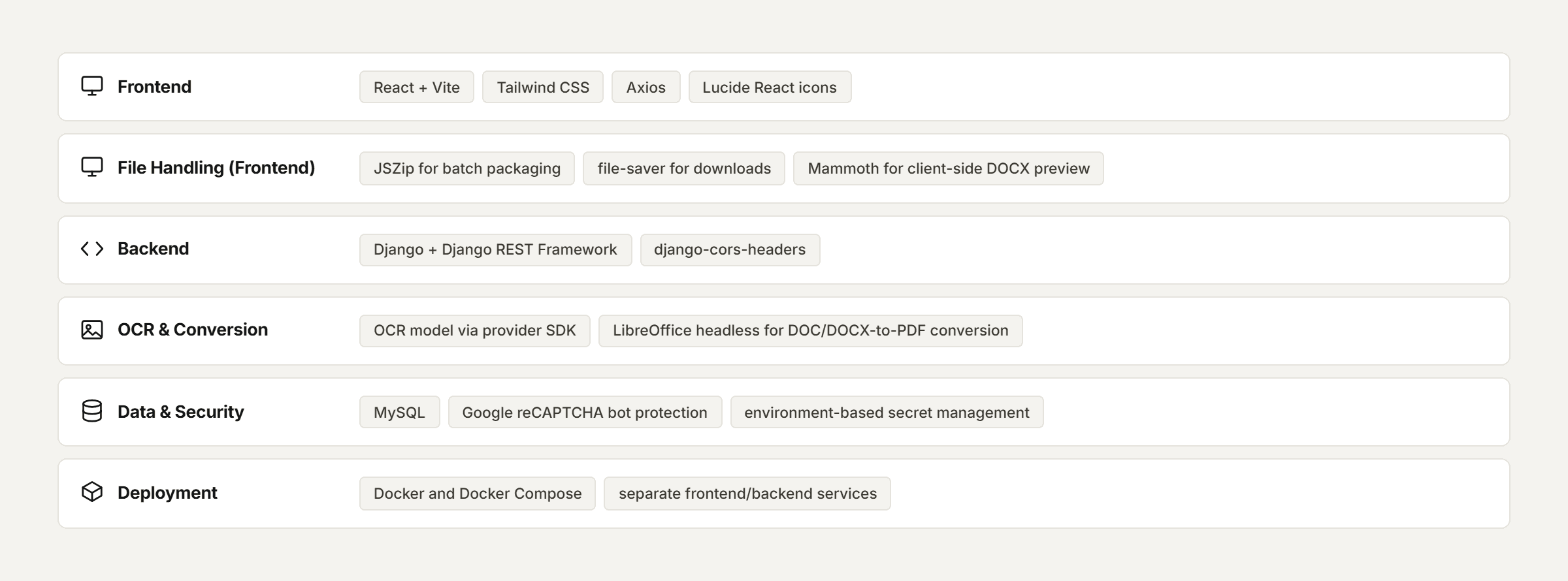
APPENDIX A - TECHNOLOGY STACK
The technology stack underpinning the system, grouped by the layer it serves.
Pfactorial_Case_Study_OCR_Extraction_Platform image 6
© 2026 Pfactorial Technologies. Client identity and product-specific implementation detail are withheld or generalized; no client data, credentials, source code, or infrastructure detail is included in this document.

Result and Analysis

ENGAGEMENT SNAPSHOT

How Pfactorial Technologies built a full-stack OCR platform that normalizes images, PDFs, legacy Word documents and mixed ZIP archives into a single, reliable text-extraction pipeline.

Pfactorial_Case_Study_OCR_Extraction_Platform image 1
Pfactorial_Case_Study_OCR_Extraction_Platform image 2
Pfactorial_Case_Study_OCR_Extraction_Platform image 3
Pfactorial_Case_Study_OCR_Extraction_Platform image 4
Pfactorial_Case_Study_OCR_Extraction_Platform image 5
Pfactorial_Case_Study_OCR_Extraction_Platform image 6